 MailerLite
 ActiveCampaign
 Omnisend
 Klaviyo
 SE Ranking
 Mangools
 Semrush
 Ahrefs
 Pipedrive
 Zoho CRM
 Salesforce
 HubSpot
 Systeme.io
 GoHighLevel
 ClickFunnels
 Vendasta
CRM for HVAC contractors
Two things decide this purchase and neither is the subscription price. The first is that you are probably shopping the wrong software category. The second is that card processing will cost you four to twelve times what the software does — and almost nobody compares those rates.
RealCostLabs is independent and reader-supported. We may earn a commission on purchases made through our links, at no extra cost to you, and our scores are never for sale.
Before the numbers: the tool we recommend most often on this page — Jobber — is one we earn nothing from. We are saying it anyway because the arithmetic says it. Where we do earn, we mark it.
Correction, 30 August 2026. An earlier version of this page quoted Jobber at $70 and $105 a month with five and ten users included. That was wrong. Jobber prices by team-size band, and its advertised annual rate is an introductory rate for twelve months only. A three-to-five person shop pays $105 a month in year one and $149 from year two. Every Jobber figure on this page is now the corrected one, and we show both years. See our full Jobber pricing breakdown.
Start with the fee that dwarfs the subscription
Every comparison of contractor software argues about $70 a month versus $149 a month. That argument is close to irrelevant, and here is why.
Field service platforms make most of their money on payment processing, not subscriptions. When your customer taps a card at the door, the platform takes a percentage.
| Platform | Card | Tap to pay | ACH / bank | Instant payout |
|---|---|---|---|---|
| Jobber | 2.9% + $0.30 | 2.7% + $0.30 | 1% | +1% |
| Housecall Pro | 2.59%–3.49% Amex and commercial cards at 3.49% | — | 1% | — |
Rates as published by each vendor, 2026. Your negotiated rate may differ at volume.
What that means on a real P&L
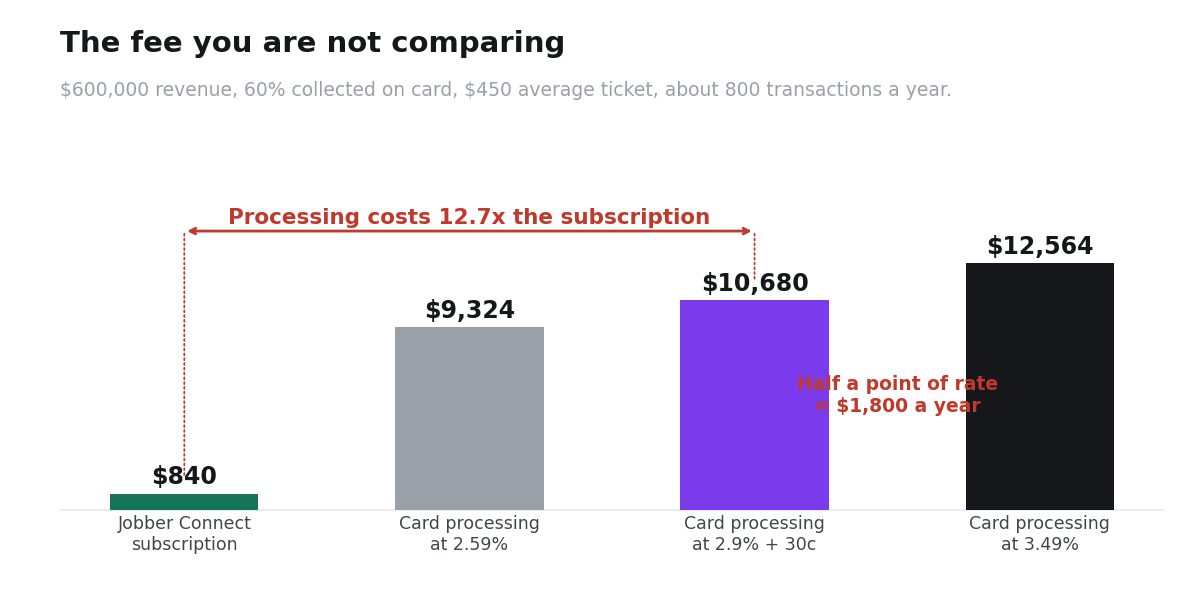
Take a shop turning over $600,000 a year with 60% of collections on card — $360,000 of card volume, at an average ticket of $450, so roughly 800 transactions.
| Line | At 2.59% | At 2.9% + $0.30 | At 3.49% |
|---|---|---|---|
| Percentage fee | $9,324 | $10,440 | $12,564 |
| Per-transaction fee | — | $240 | — |
| Annual processing cost | $9,324 | $10,680 | $12,564 |
| Software subscription | $1,260–2,748 | ||
The processing bill is six to twelve times the subscription. A rate difference of half a percentage point costs you about $1,800 a year — more than twice the entire Jobber Connect subscription you were comparing.
The single highest-value action on this page: both platforms charge 1% for ACH against roughly 2.9% for cards. Moving half your card volume to bank payment on the $600k example saves about $3,420 a year — four times the software cost. On larger recurring jobs and maintenance agreements, ask for bank payment by default and reserve cards for small tickets.
Now the category question: “CRM” is probably the wrong word
A CRM is built around a deal moving through a pipeline. Prospect, qualified lead, proposal, closed sale. That model was designed for software sales and it fits HVAC badly.
Your work is not a pipeline. It is a schedule. A call comes in, someone gets dispatched, a job happens at an address, an invoice goes out, and the same address calls again in eighteen months when the condenser fails. The deal does not close. It recurs.
The record is an address, not a person
This is the thing almost nothing written about “CRM for contractors” says plainly.
In a CRM the central object is a contact — a human with an email address. In HVAC the thing you need history on is a building:
- Which unit is installed, model and serial
- When it was installed and by whom
- What the warranty covers and when it expires
- What was replaced last visit, and what the tech flagged as failing next
- Where the shut-off is, whether there is a dog, which gate code works
The homeowner may change. The building does not. When the property sells, the equipment history should stay with the address — and in a contact-first CRM it does not, because the record belonged to the person who moved out.
Field service tools model a property with equipment attached. General CRMs model a person with deals attached. You can force a CRM to hold equipment data in custom fields, but you are rebuilding the data model by hand and it breaks the first time a tech needs it on a phone at 7am.
What the job needs, by category
| What the job needs | General CRM | Field service tool |
|---|---|---|
| Dispatch and scheduling — who is where, today | No | Core function |
| Quote on site, from a phone | Awkward | Built for it |
| Invoice and take payment at the door | No | Included, processing built in |
| Equipment and warranty history per address | Custom fields, manually | Native |
| Lead follow-up and nurture | Core function | Basic |
| Marketing automation | Strong | Weak |
The bottom two rows are the real case for a CRM, and we come back to them.
What the software costs
Three techs plus an office person
| Tool | Category | Per month | Per year | Does the job? |
|---|---|---|---|---|
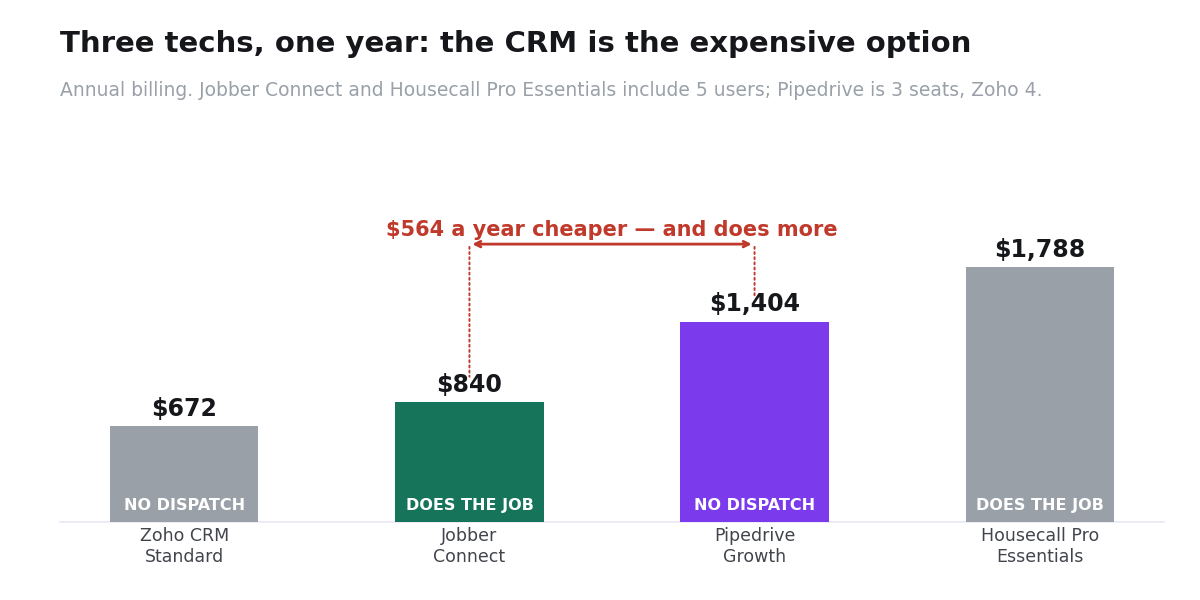
| Jobber Connect | Field service | $105 (up to 5 users) | $1,260 then $1,788 | Yes |
| Housecall Pro Essentials | Field service | $149 (5 users incl.) | $1,788 | Yes, plus GPS and routes |
| Pipedrive Growth | CRM | $117 (3 seats) | $1,404 | No — no dispatch or invoicing |
| Zoho CRM Standard | CRM | $56 (4 seats) | $672 | No — same gap |
Annual billing. Verified against each vendor’s published rate card, 2026.
In year one Jobber Connect costs $144 less than Pipedrive Growth and does substantially more of the work. In year two, when Jobber’s introductory rate ends, it costs $384 more — $1,788 against $1,404.
So the CRM is not simply the expensive option. It is the cheaper subscription that cannot dispatch a van, quote from a driveway or take a card at the door. That is the real trade, and it is worth about $384 a year from year two — roughly a tenth of what the processing rate above is worth.
Six techs — and the trap
| Tool | Seats included | Extra seats | Per month | Per year |
|---|---|---|---|---|
| Jobber Grow | 10 | Priced by band, not per seat | $210 then $299 | $2,520 then $3,588 |
| Housecall Pro Max | 8 | $75 each after | $299 | $3,588 |
| Housecall Pro Essentials + 2 | 5 | $100 each | $349 | $4,188 |
| Pipedrive Growth × 7 | per seat | $39 each | $273 | $3,276 |
Watch Housecall Pro between five and seven users: extra seats on Essentials are $100 a month each — more than the base plan costs per included user. Two extra people take you from $1,788 to $4,188 a year, at which point the more expensive Max tier is cheaper. The pricing page does not flag that.
What the problem costs if you do not fix it
Software gets compared against other software. It should be compared against the revenue it recovers, because that is the only number that decides whether $1,260 is expensive.
The formula
Missed calls per week × the share that would have booked × your average ticket × 50 weeks.
Fill in your own numbers. For a sense of scale, a shop missing five calls a week, where 40% would have booked, at a $450 average ticket, is leaving roughly $45,000 a year on the table. Against that, the entire software decision — $1,260 or $2,748 — is a rounding error.
The same arithmetic runs on maintenance agreements. If you have 200 customers due for a service reminder and no system sends it, the loss is 200 tickets, not a subscription line.
This is the real frame. Do not ask which tool is cheapest. Ask which one stops the leak you can name, then check its processing rate.
The seasonal problem nobody prices
HVAC demand is not flat. Flat out in July and August, flat out again at the first hard freeze, quiet in April and October. Per-seat software is billed flat.
If you run twelve people in peak season and six in the shoulder months, you pay peak-season seat prices year-round — or you add and remove users four times a year and hope the annual commitment allows it.
- Buy the tier, not the seats. Jobber Grow includes ten users at $210 a month in year one, one price whether nine log in or four. Tools that bundle users suit seasonal businesses; tools that meter them do not.
- Check whether your annual plan allows removing seats mid-term. Ask before you commit, not in October.
- Price your peak. If August needs twelve logins, that is your plan.
Three things that decide it in the field
These do not appear on any comparison chart and they are what determines whether the software gets used at all.
1. Does it work without signal?
Crawlspaces, basements, mechanical rooms, rural jobs. If the app needs connectivity to open a work order or capture a signature, your tech writes on paper and someone rekeys it that evening — which is the exact problem you bought software to remove. Test this on a real job before you commit, not in the office on wifi.
2. Does it sync to QuickBooks properly?
Your bookkeeper uses QuickBooks. If the sync is one-way, partial, or manual, you have bought a second system that someone reconciles by hand every month. Note that on Housecall Pro, QuickBooks Online sync sits on Essentials and above — not on Basic. If you are pricing Basic at $59 a month, price the reconciliation labor with it.
3. Will the techs actually use it?
The failure mode is not the software. It is a two-week rollout where half the crew keeps using paper and the office ends up maintaining both systems. Pick the tool your least technical tech can operate on a phone with gloves on, and roll out with one crew first.
What switching actually involves
Nobody sells you this part, so budget for it.
- Customer and property import. Names and addresses import cleanly. Equipment history, warranty dates and job notes are the hard part. Decide up front whether you are migrating history or drawing a line and starting fresh — both are defensible, but decide.
- Two weeks of running both. Plan for it rather than discovering it. Pick a start date after peak season, never during.
- One crew first. Get one team fully on the new system before the rest. They become the people who train everyone else, which works far better than a vendor webinar.
- Payment processing changeover. Underwriting and account setup take time. Start that first, not last.
When a CRM genuinely is the right answer
1. You sell commercial installs, not service calls
If your revenue comes from bid work — a $40,000 rooftop replacement, a three-month cycle, a general contractor, a specification and a competitive bid — you genuinely do have a pipeline. Stages, follow-ups, proposal versions, decision dates. A field service tool handles that poorly.
An HVAC business can run both: service work through a field tool, commercial bids through a CRM. That is two different jobs, not duplication.
2. You need a lead layer in front of the schedule
Field service tools execute work well and win it badly. If leads go cold before anyone calls back, missed calls never get followed up, or you have no way to run a maintenance-renewal campaign, that is a marketing problem and field tools do not solve it.
What to buy
| Your situation | Buy | Per year |
|---|---|---|
| Solo operator | Jobber Core (solo only) | $252, then $348 |
| 3–5 techs, service and repair | Jobber Connect | $1,260, then $1,788 |
| 6–10 techs | Jobber Grow | $2,520, then $3,588 |
| Need GPS tracking and route optimization | Housecall Pro Max | $3,588 |
| Commercial bid work, long sales cycles | Pipedrive Growth | $468/seat |
| Under 3 office users, leads only | Zoho CRM free tier | $0 |
| Lead generation is the bottleneck | GoHighLevel Starter | $970 |
GoHighLevel is the one tool here that fits the lead problem specifically. Missed-call text-back and SMS follow-up are exactly what a service business with a ringing phone needs, and unlimited users suits seasonal headcount. It is not a dispatch system and should not replace one — it sits in front of it.
The verdict
If you run service and repair calls, buy a field service tool and skip the CRM category entirely. Jobber Connect at $1,260 in year one and $1,788 after is the answer for most three-to-five-person shops, and it costs less than the CRM you were about to compare it against.
Then negotiate the processing rate, because that is where the money actually is. Half a percentage point is worth more than the whole subscription, and moving recurring work to ACH at 1% is worth several times it.
Buy a CRM when you have a genuine sales pipeline, or when your bottleneck is leads going cold rather than jobs getting scheduled. Those are different problems and they take different tools.
The expensive version of this decision is buying a CRM, spending three months bending it into a dispatch system with custom fields, and buying a field service tool anyway.
We do not earn a commission from Jobber or Housecall Pro. We recommend them here because the pricing and the fit say so.
Common questions
Is a CRM or field service software better for HVAC?
Field service software, for almost any business doing service and repair calls. It handles dispatch, on-site quoting, invoicing and equipment history — none of which a general CRM does. A CRM is right only for commercial bid work, or as a lead layer in front of the schedule.
What do HVAC software companies charge for card processing?
Jobber charges 2.9% + $0.30 for cards, 2.7% + $0.30 for tap to pay, and 1% for ACH. Housecall Pro publishes 2.59% to 3.49% depending on card type, with Amex and commercial cards at the top, and 1% for ACH. On a $600k business this is six to twelve times your subscription cost.
How do I lower processing fees?
Move recurring and large-ticket work to ACH at 1% instead of card at roughly 2.9%. On $180,000 of shifted volume that is about $3,420 a year. Then ask your provider for a volume rate once you have twelve months of history.
What is the cheapest CRM for an HVAC business?
Zoho CRM’s free tier covers three users with no time limit, which is enough for lead follow-up in a small shop. But if you need scheduling, Jobber Core at $252 in year one is cheaper than most paid CRMs and actually does the job.
How much should a small HVAC company spend on software?
A three-to-five-tech shop should expect roughly $1,260 to $2,750 a year for the platform, plus processing. If you are quoted much more, check whether you are being sold route optimization, GPS and API access you will not use.
Can I use HubSpot or Salesforce for HVAC?
You can, and it will be expensive and a poor fit. HubSpot Sales Professional is $100 per seat per month plus a mandatory onboarding fee starting around $500. Salesforce Enterprise is $175 per user. Neither dispatches a van.
What about seasonal staff?
Prefer tools that bundle users into the tier rather than charging per seat. Jobber Grow includes ten users at one price; Housecall Pro Essentials charges $100 a month for the sixth. Over a season that difference exceeds the base subscription.
Does the software work without a signal?
Test it on a real job before committing. Crawlspaces and mechanical rooms are where offline gaps show up, and a tech who cannot open a work order writes on paper instead — which removes the entire benefit.
Do I need both a CRM and a field service tool?
Some businesses genuinely do — field tool for service work, CRM for commercial bids. Do not buy both to start. Buy the one that solves the bottleneck you can name this week.
KEEP EXPLORING