 MailerLite
 ActiveCampaign
 Omnisend
 Klaviyo
 SE Ranking
 Mangools
 Semrush
 Ahrefs
 Pipedrive
 Zoho CRM
 Salesforce
 HubSpot
 Systeme.io
 GoHighLevel
 ClickFunnels
 Vendasta
Kit review
The most generous free tier in creator email, with a deliberate price wall the day you cross 10,000 subscribers.
Ratings from G2 (217 reviews), Capterra (241) and Trustpilot (4.2 on the kit.com profile, 1.9 on the legacy convertkit.com profile), pricing verified October 11, 2026.
The verdict
Kit, the product that spent its first decade as ConvertKit before the October 2024 rename, is the email platform built around one idea: a creator is a person with an audience, not a marketer with a list. That single design choice runs through everything. Subscribers are tagged and segmented instead of being trapped in overlapping lists, the automation builder is visual, and the free plan does something almost no competitor will do, which is let you grow to 10,000 subscribers and send unlimited email without paying a cent. Plan-by-plan numbers, add-ons and real team bills are in our Kit pricing 2026 breakdown.
That free tier is the most important fact in this review, so it goes first. For a writer, a coach, a course seller, or a newsletter operator who has not yet monetized, Kit is effectively a no-cost tool with a real automation engine, unlimited landing pages, unlimited forms, and native digital-product checkout through Stripe. Very few tools in this category give you that much for nothing, and it is the main reason the satisfaction scores stay high: people who use Kit for what it is built for tend to like it.
The counterweight is what happens after 10,000 subscribers. The price does not climb gently, it steps up sharply, and the most useful analytics (engagement reporting, subscriber scoring) sit behind the higher Pro plan rather than the entry paid plan. Email design is the other soft spot: the builder is text-first and the template library is thin. Independent deliverability testing puts Kit at solid rather than leading. So our Lab Score of 8.2 reflects a real split. As a free or low-cost creator tool it is one of the best-value products we have measured. As a mid-scale marketing platform it is fairly priced but no longer the cheapest-for-what-you-get, which is the axis we weight most heavily.
What Kit really costs at scale
The short version is below. For the plan-by-plan detail, the full add-on table and the ways to pay less, see our dedicated Kit pricing breakdown.
Kit bills on the number of subscribers you actively email. Unsubscribed and duplicate contacts do not count toward your bill, every plan includes unlimited sends, and there are no overage fees, so a good month of sending never produces a surprise charge. There are three plans: Newsletter (free), Creator, and Pro (the plan formerly called Creator Pro).
The free Newsletter plan covers up to 10,000 subscribers and includes unlimited landing pages, unlimited forms, unlimited broadcasts, tagging and segmentation, digital-product sales, plus one automation and one email sequence. The limits are real: a single automation, a single sequence, Kit branding on your emails, restricted template customization, and email-ticket plus help-center support only. A creator who stays under 10,000 subscribers can run on that for as long as the list stays under the ceiling.
The paid plans are where the real cost lives. The table below shows monthly billing from 1,000 to about 55,000 subscribers. Annual billing runs roughly 17 percent cheaper.
| Subscribers | Newsletter (free) | Creator (monthly) | Pro (monthly) |
|---|---|---|---|
| Up to 10,000 | $0 | see tiers below | see tiers below |
| 1,000 | $0 | $39 | $79 |
| 3,000 | $0 | $59 | $99 |
| 5,000 | $0 | $89 | $139 |
| 10,000 | $0 | $139 | $189 |
| 25,000 | n/a | $199 | $279 |
| ~55,000 | n/a | $379 | $519 |
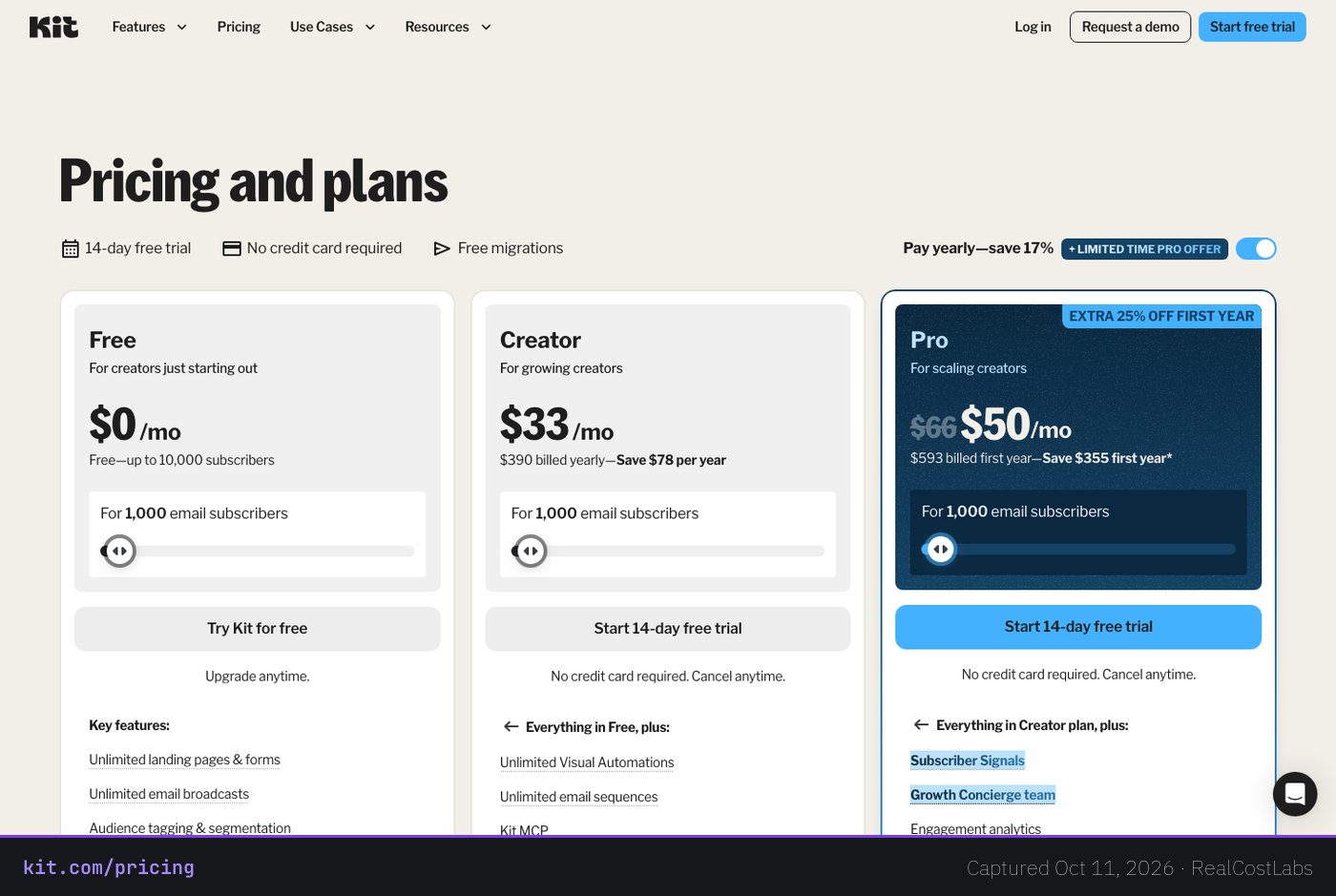
Now the part the pricing page does not spell out: the annual cost at a realistic size. A creator with 5,000 subscribers on Creator pays $89 per month, which is $1,068 per year on monthly billing, or roughly $75 per month (about $900 per year) if they pay annually. Move that same person to Pro for engagement analytics and subscriber scoring and it becomes $139 per month, $1,668 per year (roughly $117 per month annual). At 1,000 subscribers the annual Creator rate is about $33 per month ($390 billed yearly, saving $78), and annual Pro is about $66 per month ($790 billed yearly, saving $158).
The number worth circling is the jump right after the free ceiling. You can sit at 10,000 subscribers for $0, and the moment you cross it you are into paid pricing that, on Creator, lands at $139 per month at the 10,000 line itself. That cliff is the single most-cited pricing complaint in independent reviews on G2 and Capterra, and it is fair. Kit gives away an unusually large free tier and then asks you to pay in earnest once you have grown past it. There is a 14-day free trial on the paid plans with no credit card required, plus a 30-day money-back guarantee, so you can test the paid features before the wall actually matters to you.
Deliverability: solid, not the leader
For an email tool, deliverability is the metric that decides whether everything else mattered. A beautiful automation that lands in spam is worth nothing. So we separate two very different numbers here, because Kit’s marketing and the independent testing do not agree, and you should trust the independent figure.
EmailToolTester, which runs seed-list inbox tests across providers, measured Kit at an average deliverability of 88.2 percent and described it as solid but not the strongest, noting that the top providers clear 95 percent. In its 2025 tools-based deliverability rating, EmailToolTester gave Kit 4 out of 5, the same score it assigned ActiveCampaign. That is a respectable result. It is not a leading one.
Kit’s own self-reported claims are far rosier: a 99.8 percent delivery rate and a 40 percent average open rate, on infrastructure that sends more than a billion messages a month. Those are the company’s figures, not independent ones, and delivery rate (did the server accept it) is a softer measure than inbox placement (did a human see it). The platform does give you the right tools to protect your sender reputation: verified-domain authentication with DMARC and SPF, IP allowlisting, and a dedicated-IP option for high-volume senders on shared infrastructure by default.
The practical read: Kit will get your email delivered reliably for normal creator and newsletter use, and authentication support is there if you set it up. If your business depends on squeezing out the last few points of inbox placement at large volume, a provider that tests above 95 percent has a measurable edge, and that gap is part of why this is an 8.2 and not a 9.
Features, in depth
Kit’s feature set is opinionated. It is very good at the things creators do repeatedly and noticeably thinner on the things general-purpose marketers and ecommerce stores need.
- Tag-based subscriber model. Instead of dumping people into rigid, overlapping lists, Kit tags subscribers and lets you segment on those tags. Someone can be a free reader, a course buyer, and a webinar attendee at once without being counted or managed three times. This is the most consistently praised part of the product.
- Visual automation builder. You map sequences, triggers, and conditions on a visual canvas. It is capable, and on paid plans automations and email sequences are unlimited. There is a learning curve for the more advanced branching logic, but the model is sound.
- Commerce, built in. You can sell digital products and paid newsletters natively with Stripe payments attached, no separate cart needed. For a creator selling an ebook, a template pack, or a paid subscription, this collapses two tools into one.
- Creator Network. Kit creators can recommend each other’s free and paid audiences to their own subscribers, a built-in cross-promotion channel that competitors mostly do not have. It is a genuine growth lever rather than a checkbox feature.
- Unlimited landing pages and forms on every tier, including free. Most rivals meter these. Kit does not, which matters a lot when you are starting from zero and your forms are how you grow.
- Course-platform fit. Native integrations with Thinkific and Teachable make Kit a natural backbone for people selling courses, alongside Shopify, WordPress, Canva, Zapier, and Stripe.
- Kit MCP and SMS. Paid plans add SMS marketing and Kit’s MCP integration, plus A/B testing and RSS-to-email sequences.
The Pro plan layers on the analytics and team features that Creator deliberately withholds: Subscriber Signals and subscriber scoring, engagement analytics with an insights dashboard, a newsletter referral system, Facebook Custom Audiences sync, advanced A/B testing, unlimited team users with collaborative editing, the ability to edit links in emails you have already sent, and priority support. The thing to notice is that several of these, especially engagement analytics and subscriber scoring, are basic reporting, and on Kit they cost extra.
Where Kit is genuinely weak is email design. The builder is text-first and a little clunky, HTML and CSS editing is restricted, and there are only about 23 free templates (premium marketplace templates run roughly $19 to $39 each). If you want visually rich, image-heavy, ecommerce-style emails, this is not the tool. Integrations are the other soft area: EmailVendorSelection counts about 54 native integrations even though Kit markets 90-plus or 100-plus, and the deep ecommerce-platform connections in particular are lighter than rivals. There is also no native mobile app, no separate reply-to address (a specific complaint cited on Capterra), and no built-in spam or inbox pre-send testing.
Ease of use
For its intended user, Kit is approachable. Capterra reviewers rate Ease of Use at 4.4 out of 5, and the tag-based model is genuinely easier to reason about than the list-and-segment tangle most marketing tools impose. Getting a form up, tagging subscribers, and sending a broadcast is quick, and the free migration service on paid plans takes the pain out of moving from another provider.
The friction shows up in two places. The first is advanced automation: once you move past linear sequences into branching logic, the visual builder asks more of you, and that is where the learning curve sits. The second is design: because the email editor is text-first and template options are limited, a sender coming from a drag-and-drop builder will hit a lower creative ceiling. Neither is a dealbreaker for a writer or coach. Both matter if your emails need to look like a polished ecommerce campaign.
Who it is for
Kit is for creators in the literal sense: writers, newsletter operators, bloggers, coaches, podcasters, and course sellers who lead with words and relationships rather than product photography. If you are building an audience and may eventually sell a digital product or a paid newsletter, the free tier alone makes Kit one of the easiest tools to recommend, and the tag-based model will keep making sense as you grow.
It is a weaker fit for ecommerce brands that need visually rich, image-led emails and deep store integrations, and for data-driven marketers who treat engagement analytics and lead scoring as table stakes rather than premium add-ons. Businesses that will outgrow Kit’s automation depth, or that want richer reporting at the entry price, should weigh the alternatives below before committing.
Three real-world scenarios
The newsletter writer at 4,000 free subscribers
A solo writer publishing weekly to 4,000 subscribers pays Kit nothing. Unlimited broadcasts, a landing page, tagging, and one automation cover the whole operation. When they launch a $30 ebook, Stripe-backed checkout is already built in. This is Kit at its best, and it is the clearest example of the cheapest capable tool also being the most satisfying. Lab Score territory: a 9 for this person.
The course creator crossing 10,000 subscribers
A course seller on Teachable grows past the free ceiling and onto Creator at 10,000 subscribers, which is $139 per month ($1,668 per year), or about $117 per month on annual billing. The native course integrations and unlimited automations earn their keep, but the price cliff is real and the basic Creator analytics start to feel limiting. This is the exact moment the most-cited pricing complaint becomes personal.
The data-driven marketer who wants scoring at 5,000
A marketer at 5,000 subscribers wants subscriber scoring and engagement analytics, so Creator at $89 per month is not enough and Pro at $139 per month ($1,668 per year) is required. At that point the analytics-per-dollar math invites a direct comparison with ActiveCampaign, whose reporting and automation go deeper for businesses rather than creators.
Kit vs the alternatives
Kit wins on free-tier generosity and creator-specific design, and loses on email design polish, deliverability ceiling, and analytics-at-entry-price. Here is how the realistic rivals stack up.
| Tool | Best for | Free tier | Edge over Kit |
|---|---|---|---|
| Kit | Creators, newsletters, course sellers | Up to 10,000 subs | Free ceiling, tag model, Creator Network |
| MailerLite | General-purpose, design-led senders | Yes, smaller | Cheaper, far better email design and templates |
| beehiiv | Newsletter publishers and monetization | Yes | Native ad network, cheaper above 50,000 subs |
| ActiveCampaign | Businesses needing deep automation and CRM | No | Deeper automation, CRM, reporting |
If your weakness with Kit is email design or you simply want to spend less, MailerLite is the value pick: cheaper, with a much stronger drag-and-drop builder and template library, and it is more general-purpose if you are not strictly a creator. If you are squarely a newsletter publisher focused on monetization, beehiiv is the closest creator-versus-creator rival, with a built-in ad network and pricing that pulls ahead of Kit once you are past roughly 50,000 subscribers. And if you are a business that has outgrown Kit’s automation and wants real CRM and engagement reporting, ActiveCampaign goes much deeper, and it carries the same 4-out-of-5 EmailToolTester deliverability rating, so you are not trading away inbox placement to get it.
Pros and cons
Pros
- One of the most generous free tiers in the category: up to 10,000 subscribers with unlimited sends, landing pages, and forms.
- Tag-based subscriber model: one subscriber can carry many tags instead of living in overlapping lists.
- Native digital-product and paid-newsletter sales through built-in Stripe payments.
- Creator Network gives a built-in audience cross-promotion channel rivals lack.
- No overage fees, unlimited sends on every plan, and unsubscribed contacts do not count toward billing.
- Strong independent satisfaction scores (G2 4.4, Capterra 4.6) and free migration on paid plans.
Cons
- Steep price jump the moment you pass the free 10,000-subscriber ceiling, the top pricing complaint.
- Engagement analytics and subscriber scoring are gated behind the higher Pro plan, not Creator.
- Limited email design: text-first builder, restricted HTML/CSS, only about 23 free templates.
- Deliverability tests at 88.2 percent, solid but below the 95-percent-plus leaders.
- Fewer real integrations than marketed (about 54 native) and light deep ecommerce support.
- No native mobile app, no separate reply-to address, and no built-in pre-send spam testing.
FAQ
Is Kit the same as ConvertKit?
Yes. ConvertKit rebranded to Kit in October 2024. It is the same company and product. You will still see the legacy convertkit.com name on some review profiles, which is why the Trustpilot scores differ between the two profiles.
Is Kit’s free plan actually free?
Yes, genuinely. The Newsletter plan is $0 per month for up to 10,000 subscribers with unlimited email sends, unlimited landing pages, and unlimited forms. The trade-offs are one automation, one sequence, Kit branding on emails, limited template customization, and email-ticket plus help-center support only.
How much does Kit cost at 5,000 subscribers?
On the Creator plan, 5,000 subscribers is $89 per month, which works out to $1,068 per year on monthly billing or about $900 per year ($75 per month) if you pay annually. The Pro plan at 5,000 is $139 per month ($1,668 per year).
Why does the price jump so much after 10,000 subscribers?
The free tier ends at 10,000 subscribers, and Kit prices its paid plans in earnest above that line. On Creator, the 10,000-subscriber tier is $139 per month. The size of that step from free to paid is the most common pricing complaint in independent reviews.
How good is Kit’s deliverability?
Independent seed-list testing by EmailToolTester put Kit at 88.2 percent average deliverability, described as solid but not the strongest, with a 4-out-of-5 tools-based rating in 2025. Kit’s own self-reported figure is a 99.8 percent delivery rate, but that is the company’s number, not an independent inbox-placement test.
Can I sell products and paid newsletters with Kit?
Yes. Kit has native commerce: you can sell digital products and paid newsletters with Stripe payments built in, and product sales are available even on the free Newsletter plan.
What is the difference between the Creator and Pro plans?
Creator adds unlimited automations and sequences, A/B testing, SMS, removal of Kit branding, and 24/7 live-chat support. Pro adds the analytics and team layer: subscriber scoring, engagement analytics and an insights dashboard, a referral system, Facebook Custom Audiences sync, advanced A/B testing, unlimited team users with collaborative editing, and editing links in already-sent emails.
What are the best alternatives to Kit?
MailerLite is the cheaper, design-led alternative with far better templates. beehiiv is the closest newsletter-publisher rival, with a native ad network and better pricing above roughly 50,000 subscribers. ActiveCampaign is the pick for businesses that need deeper automation and CRM and carries the same 4-out-of-5 deliverability rating.
KEEP EXPLORING
Ready to try Kit?
Start free up to 10,000 subscribers, or test a paid plan for 14 days with no credit card.
Try Kit →RealCostLabs is independent and reader-supported. We may earn a commission on purchases made through our links, at no extra cost to you, and our scores are never for sale.