 MailerLite
 ActiveCampaign
 Omnisend
 Klaviyo
 SE Ranking
 Mangools
 Semrush
 Ahrefs
 Pipedrive
 Zoho CRM
 Salesforce
 HubSpot
 Systeme.io
 GoHighLevel
 ClickFunnels
 Vendasta
ClickUp review
The $7 entry price is real; the $40-per-user configuration arrives later, once AI add-ons, workspace-wide upgrades and guest conversions have done their work.
Ratings from G2 (13,551 reviews), Capterra (4,620) and Trustpilot (663), pricing verified October 11, 2026.
The verdict
ClickUp is the cheapest way into a serious all-in-one work platform, and by a wide margin. The Unlimited plan costs $7 per user per month billed annually and includes unlimited storage, unlimited custom fields, native time tracking, goals, portfolios and ClickUp Chat — a bundle that competitors routinely gate behind $20-plus tiers. The free plan allows unlimited tasks and unlimited members, which almost nothing else in the category matches. The crowd likes it, too: 4.6/5 on G2 across 13,551 reviews and 4.6/5 on Capterra across 4,620, sample sizes large enough for the score to mean something. Trustpilot sits lower at 4.1/5 from 663 reviews, which is normal for the channel but worth noting.
The real-cost story is less tidy. ClickUp keeps its base plans cheap and monetizes the edges. AI is a second per-seat subscription — $9 per user per month for Brain AI or $28 for Everything AI — and multiple third-party pricing guides report it is charged on every paid member, not only the people who use it. Upgrades apply to the entire workspace, so one team wanting Business features means every seat in the workspace pays Business rates. Monthly billing runs 43-58% above annual pricing, one of the widest such gaps among mainstream PM tools. And the guest model can quietly convert external collaborators into billed members.
Run the 10-seat math and the spread is stark. Business billed annually is $120 a month, or $1,440 a year. The same team billed monthly pays $2,280 a year. Add Brain AI for every seat and the annual figure becomes $2,304; step up to Everything AI and it reaches $4,128 — 2.9 times the configuration you price out on day one. None of these are scandalous numbers for work management software. The issue is the distance between the price on the homepage and the price on a plausible invoice twelve months later.
We score ClickUp 7.8. That edges out monday.com at 7.6 because the entry price is genuinely lower for a comparable capability set, and because the satisfaction scores hold up at very large sample sizes. It stops short of the mid-8s because the AI packaging, the whole-workspace upgrade rule and the guest conversion mechanics all move money in the vendor’s direction, at scale, in ways the pricing page understates.
What ClickUp really costs at scale
ClickUp’s published pricing, verified October 11, 2026: Unlimited at $7/user/month billed annually or $10 billed monthly, Business at $12 annually or $19 monthly, Enterprise on a contact-sales quote. Billing is per Workspace, and an upgrade covers every member in that workspace — there is no mixing of free and paid seats, and no running two plan tiers side by side. The AI products are add-ons layered on top of any paid plan, priced per user like a second subscription.
| Plan | Monthly | Annual (per mo) | What you get |
|---|---|---|---|
| Free Forever | $0 | $0 | Unlimited tasks and members; 60MB storage, 5 Spaces, 2 Teams, 1 form, 1 wiki; 5 active automation rules and 100 executions/month; guests must be given full access; advanced features are trial-only |
| Unlimited | $10/user | $7/user ($84/user/yr) | Unlimited storage, Spaces, Gantt charts, custom fields and integrations; native time tracking, goals, portfolios, ClickUp Chat; 500 active rules and 1,000 automation executions/month; 5 guest seats plus 2 per additional paid user |
| Business | $19/user | $12/user ($144/user/yr) | Everything in Unlimited plus unlimited dashboards, message history and timeline views; webhooks and automation integrations; 5,000 automation executions/month; sprints, workload, mind maps, private whiteboards; 10 guest seats plus 5 per additional paid user |
| Enterprise | Custom quote | Custom quote | SAML SSO and SCIM, audit log, custom roles and enterprise permissions, 250,000 automation executions/month, custom branding, HIPAA/MSA available, data residency |
| Brain AI (add-on) | $9/user | $7.20/user | AI assistant and agents, AI chat with premium models (Claude, ChatGPT, Gemini), enterprise search; 1,500 AI Super Credits per user/month |
| Everything AI (add-on) | $28/user | $22.40/user | Full agentic suite: AI notetaker, image generation, AI fields, AI automations, 3x super agent usage; 5,000 AI Super Credits per user/month; extra credits $10 per 10,000 |
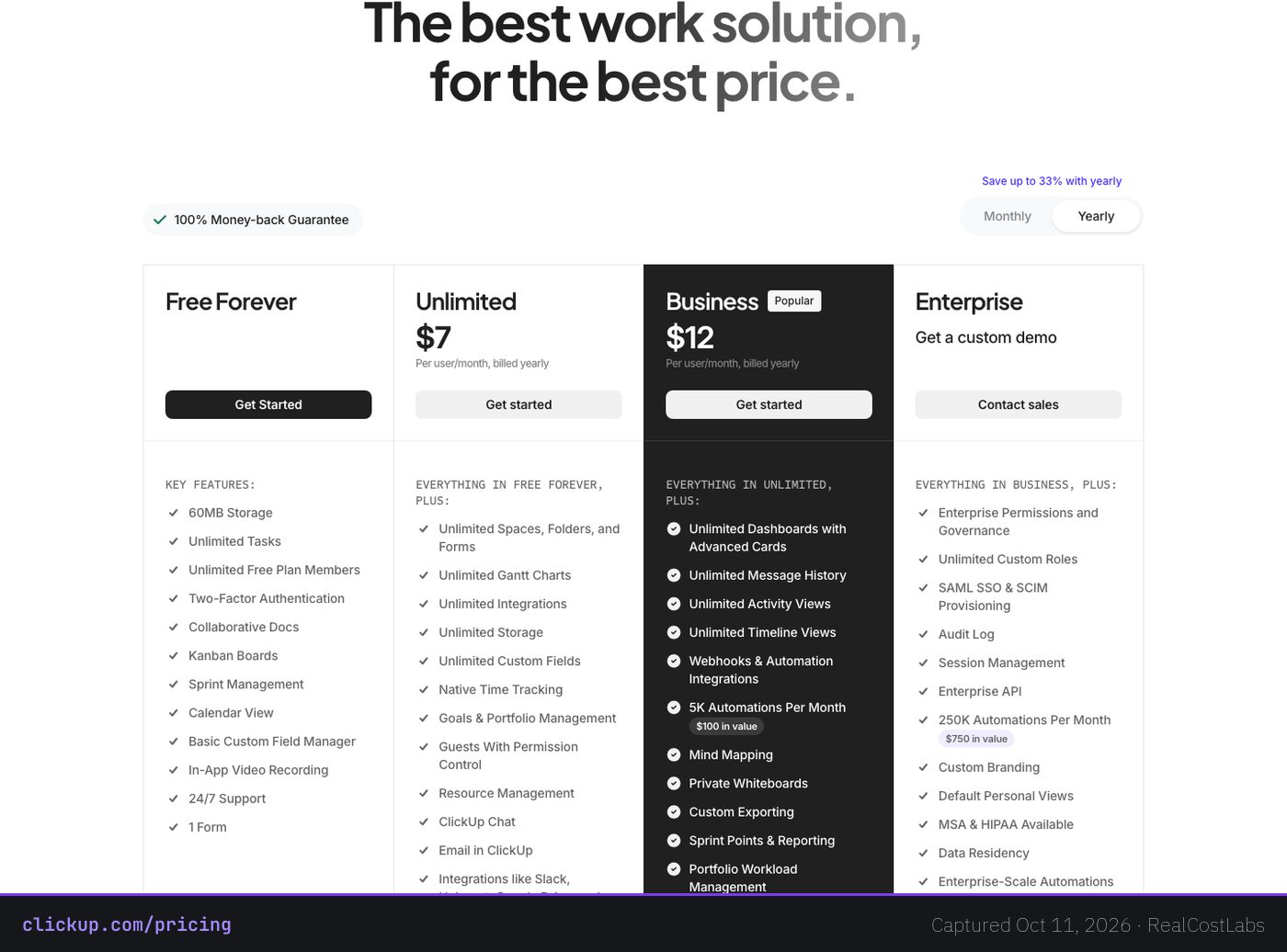
Our standard basis is a 10-seat marketing or operations team on the Business plan. Billed annually, that is $120 a month, $1,440 a year — genuinely cheap for what the tier includes. Billed monthly, the identical setup costs $190 a month, $2,280 a year, a 58% premium for the flexibility of leaving. Add Brain AI across all ten seats at the annual rate and the total rises to $192 a month, $2,304 a year. The full stack — Business plus Everything AI, billed annually — lands at $344 a month, $4,128 a year, which works out to roughly $34 per seat per month against the $12 you originally budgeted. Business plus Brain AI billed monthly is $280 a month, $3,360 a year. If your seat count or mix differs, our real cost calculator will run the same math on your numbers.
There is no conventional time-boxed trial on paid tiers. Instead ClickUp offers a 30-day refund under a 100% satisfaction guarantee, and it prorates charges when you add seats mid-cycle. Both mechanics are buyer-friendly and both are rarer than they should be in this category.
The hidden costs
Whole-workspace upgrades. ClickUp’s own pricing FAQ is explicit that to upgrade you must “upgrade your entire Workspace, which means all members.” You cannot buy Business features for the five people who need sprints while everyone else stays on Unlimited. Every seat moves to the higher tier, and the delta is $5 per user per month at annual rates — on every user, forever.
AI is a second per-seat subscription. Brain AI adds $9/user/month and Everything AI adds $28/user/month on top of the base plan, and third-party pricing guides (eesel, Quackback, Alfred) report the add-on is charged on every paid member, not only the people who touch the AI features. Business plus Everything AI is effectively $40/user/month at list. Heavy use beyond the bundled allotment is metered through AI Super Credits at $10 per 10,000 — a usage bill sitting on top of two subscriptions.
The monthly-billing premium. Unlimited is $10 monthly against $7 annual; Business is $19 against $12. That 43-58% spread is one of the widest among mainstream PM tools, and it means a team that starts monthly to stay flexible is paying $840 more per year on a 10-seat Business setup than the advertised annual figure suggests.
Guest-to-member conversion. Paid plans include a limited pool of full-permission guest seats — 5 plus 2 per additional paid user on Unlimited, 10 plus 5 on Business — alongside unlimited read-only guests. Grant an external collaborator edit rights beyond that pool and they become a billed member. eesel’s 2026 guide documents a bill jumping from $150 to nearly $1,200 through exactly this mechanism, with no warning pop-up and no confirmation email. Agencies and client-facing teams should treat guest permissions as a billing control, not a convenience setting.
Automation execution caps. Automations are capped per month by plan: 100 on Free, 1,000 on Unlimited, 5,000 on Business. An automation-heavy team that outgrows Business has exactly two options — restructure its workflows or negotiate Enterprise, where the cap is 250,000. There is no mid-tier top-up.
Per-workspace billing. Each Workspace is billed and upgraded separately. An agency running one workspace per client pays full freight for each one; there is no umbrella license that spans workspaces below Enterprise conversations.
The 2025 AI repackaging. ClickUp previously sold a flat $7/user AI add-on. That was replaced by the $9 Brain AI and $28 Everything AI tiers plus metered Super Credits, per multiple 2026 third-party pricing guides. Existing AI users effectively saw the floor price rise and a usage meter appear — a pattern worth remembering when budgeting for whatever the 2027 packaging looks like.
Features that matter
The free plan is the most genuinely usable in the category. Unlimited tasks and unlimited members means a 30-person team can actually run on it, where most competitors cap free tiers at 2-10 users. The constraints are storage (60MB total, so attachments live elsewhere), structure (5 Spaces, 2 Teams, 1 form, 1 wiki), automations (100 executions a month) and permissions — free-plan guests must be given full access, which rules it out for most client work.
The Unlimited plan is where the price-to-value case is strongest. Unlimited storage arrives on the first paid tier rather than being reserved for the top plans, and the tier includes native time tracking, goals, portfolios, Gantt charts, unlimited custom fields and integrations, and ClickUp Chat. Several of those — time tracking in particular — are paid add-ons or upper-tier features elsewhere.
Business adds the operational layer mid-sized teams actually need: unlimited dashboards, full message history, timeline views, webhooks, sprints, workload management, mind maps and private whiteboards, plus the jump from 1,000 to 5,000 automation executions and from 500 to unlimited active rules. At $12/user/month annually it undercuts most direct competitors’ equivalent tiers.
The AI suite is capable but priced as its own product. Brain AI covers the assistant, agents, enterprise search and AI chat with premium third-party models (Claude, ChatGPT, Gemini) with 1,500 Super Credits per user per month. Everything AI extends that to a notetaker, image generation, AI fields, AI automations and 3x agent usage with 5,000 credits. Evaluate it as a separate purchase with its own ROI case, because that is how you will be billed for it.
Enterprise brings the compliance checklist — SAML SSO, SCIM provisioning, audit logs, custom roles, HIPAA and MSA availability, data residency — plus the 250,000 automation ceiling and custom branding. Pricing is quote-only, so budget certainty ends at the Business tier.
Who should choose ClickUp
Teams of roughly 5-50 that want one tool to replace three or four — tasks, docs, chat, whiteboards, time tracking, dashboards — and are willing to commit to annual billing will get more capability per dollar from ClickUp than from anything else we have scored in this category. The $7 Unlimited tier is a legitimate bargain, not a teaser: unlimited storage and native time tracking on the entry paid plan is an unusual combination. Bootstrapped startups and small agencies that can live inside the free plan’s structural limits get an actually-free workspace with no member cap. And teams that either skip the AI add-ons or adopt them deliberately, with the per-seat cost modeled up front, will find the total cost of ownership stays well below the category norm.
Who should look elsewhere
Agencies running one workspace per client should model per-workspace billing carefully before committing — every workspace is upgraded and paid for separately, and the guest-conversion mechanics documented above make external-collaborator permissions a standing billing risk. Automation-heavy operations teams that will blow through 5,000 executions a month face a forced Enterprise conversation with no published price. Organizations that need different tiers for different teams cannot have them in one workspace; ClickUp is all-or-nothing per workspace. And buyers who want AI included in the base price rather than sold as a $9-28 per-seat second subscription should compare monday.com and Asana, both of which we have reviewed with the same real-cost lens. Our ranked guide to choosing marketing software puts the whole field side by side.
FAQ
How much does ClickUp really cost for a 10-person team?
On the Business plan billed annually, $1,440 a year ($120 a month). Billed monthly, the same setup is $2,280 a year. Adding Brain AI for all seats brings the annual figure to $2,304, and Business plus Everything AI reaches $4,128 a year — roughly 2.9 times the base annual configuration.
Is ClickUp’s free plan actually usable?
Yes, with caveats. It allows unlimited tasks and unlimited members, which is rare, but caps storage at 60MB, Spaces at 5 and automation executions at 100 a month, and guests can only be given full access. It works as a real workspace for small teams with light attachment and automation needs; it is not suited to client-facing work.
How much does ClickUp AI cost?
AI is an add-on on top of any paid plan: Brain AI is $9/user/month ($7.20 billed annually) and Everything AI is $28/user/month ($22.40 annually). Third-party pricing guides report the charge applies to every paid member in the workspace. Usage beyond the bundled AI Super Credits is billed at $10 per 10,000 credits.
Can I upgrade just one team in my ClickUp workspace?
No. ClickUp’s pricing FAQ states that upgrading applies to your entire Workspace and every member in it. A workspace cannot mix free and paid seats or run two plan tiers, and each separate workspace requires its own individual upgrade and payment.
KEEP EXPLORING
See how ClickUp compares
ClickUp against monday.com, Asana and the rest of the field, ranked by what they cost at renewal, not signup.
RealCostLabs is independent and reader-supported. We may earn a commission on purchases made through our links, at no extra cost to you, and our scores are never for sale.