 MailerLite
 ActiveCampaign
 Omnisend
 Klaviyo
 SE Ranking
 Mangools
 Semrush
 Ahrefs
 Pipedrive
 Zoho CRM
 Salesforce
 HubSpot
 Systeme.io
 GoHighLevel
 ClickFunnels
 Vendasta
monday.com review
A genuinely capable Work OS that two very different audiences score in opposite directions, and the gap is the whole story.
Ratings from G2 (15,127 reviews), Capterra (6,054) and Trustpilot (rated Poor, 2.5/5), pricing verified October 11, 2026.
The verdict
monday.com is one of the most capable work platforms you can buy in 2026, and the people who review software for a living agree: 4.7 on G2 across 15,127 reviews, 4.6 on Capterra across 6,054. Those are not vanity numbers. They reflect a product that does a lot, looks good doing it, and covers four jobs (work management, CRM, software development, and service) inside one account. If your team needs a flexible, color-coded place to run projects and pipelines, monday.com will not be the thing that lets you down on capability. Plan-by-plan numbers, add-ons and real team bills are in our monday CRM pricing 2026 breakdown.
But there is a second number, and it is the most important signal in this entire review. On Trustpilot, the open consumer channel, monday.com is rated Poor at 2.5 out of 5 across roughly 2,833 reviews and more than 3,400 contributors. That is not a small wobble. It is a wide, consistent gap, and it points almost entirely at the company rather than the software. The complaints cluster on three things: billing and auto-renewal surprises, support that is hard to reach as a human, and price increases. Software reviewers rate the product highly. The people who had a billing problem rate the company poorly. Both can be true, and a careful buyer should plan for both.
Our Lab Score is 7.6 out of 10. monday.com earns most of that on capability and on the satisfaction of users who picked the right plan. It loses points where our brand thesis is sharpest: value at scale. The cheapest capable tool is usually the most satisfying one, and monday.com is not the cheapest capable tool. A hard 3-seat minimum on every paid plan, the most useful features fenced behind the higher tiers, and a Capterra Value-for-Money score of 4.3 (its lowest sub-score by a clear margin) all say the same thing. You are buying a strong product, and you are paying a premium for it, and you should go in with your eyes open about both halves of that sentence.
What monday.com really costs at scale
The short version is below. For the plan-by-plan detail, the full add-on table and the ways to pay less, see our dedicated monday CRM pricing breakdown.
The sticker prices look approachable. The real bill depends on three multipliers that the pricing page does not put in front of you: the 3-seat minimum, the per-seat structure, and which features live on which tier. monday.com sells two separate product lines with separate price cards. Here is the Work Management ladder, in US dollars, per seat, per month.
| Work Management plan | Annual /seat/mo | Monthly /seat/mo | What you get |
|---|---|---|---|
| Free | $0 | $0 | Max 2 seats, up to 3 boards, 3 Docs, 200+ templates, 8 column types, mobile apps. No automations or integrations. |
| Basic | $9 | $12 | Unlimited items, unlimited free viewers, 1,000 AI credits/mo. No automations, no integrations, no timeline or Gantt. |
| Standard | $12 | $14 | 250 automation + 250 integration actions/mo, timeline/Gantt/calendar, guest access, 2,000 AI credits/mo. |
| Pro | $19 | $24 | 25,000 automation + 25,000 integration actions/mo, time tracking, formula column, chart view, private boards, 3,000 AI credits/mo. |
| Enterprise | Custom quote | Custom quote | 250,000 automation/integration actions/mo, 20,000 AI credits/mo, 99.9% uptime SLA, HIPAA, SSO, audit log. |
Now the part that matters: the 3-seat minimum applies to every paid plan. There is no 1-seat Basic. A solo operator or a two-person shop who wants the cheapest paid tier still pays for three seats. At $9 per seat annually, the floor is $27 per month, or $324 per year, for the entry plan. A solo who only needs one seat is effectively forced to overpay by roughly $216 per year for two seats they will never log into. The Free plan caps at 2 seats and strips out automations and integrations entirely, so it is a real option for a duo running light, but not for anyone who wants the platform to do work on its own.
Scale up and the annual numbers get concrete. On Standard, a 10-seat team runs $1,440 per year and a 25-seat team runs $3,600 per year. On Pro, the same teams run $2,280 and $5,700 per year. Those figures assume annual billing; choosing monthly billing pushes each seat up by roughly 20 percent. The jump from Standard to Pro is where a growing team feels the pinch, because the features it wants next (time tracking, the formula column, chart view, private boards, and a far larger automation budget) all sit on Pro, not Standard.
| Team size (annual billing) | Standard /year | Pro /year |
|---|---|---|
| 3 seats (the floor) | $432 | $684 |
| 10 seats | $1,440 | $2,280 |
| 25 seats | $3,600 | $5,700 |
The cheapest possible way into the platform is $27 per month: three seats of Basic on annual billing. The catch is that Basic has no automations, no integrations, and no timeline view, so the cheapest door opens into the smallest room. A team that buys monday.com for what makes it monday.com ends up on Standard or Pro, which is where the real-cost math above applies.
monday CRM, and value per seat
monday CRM is sold and priced separately from Work Management, and it is the line where our core CRM metric, value per seat, deserves a hard look. The Work Management Free tier does not include CRM features, and there is no free-forever CRM plan at all. You get a 14-day free trial (no card required is stated), and after that you are on a paid seat.
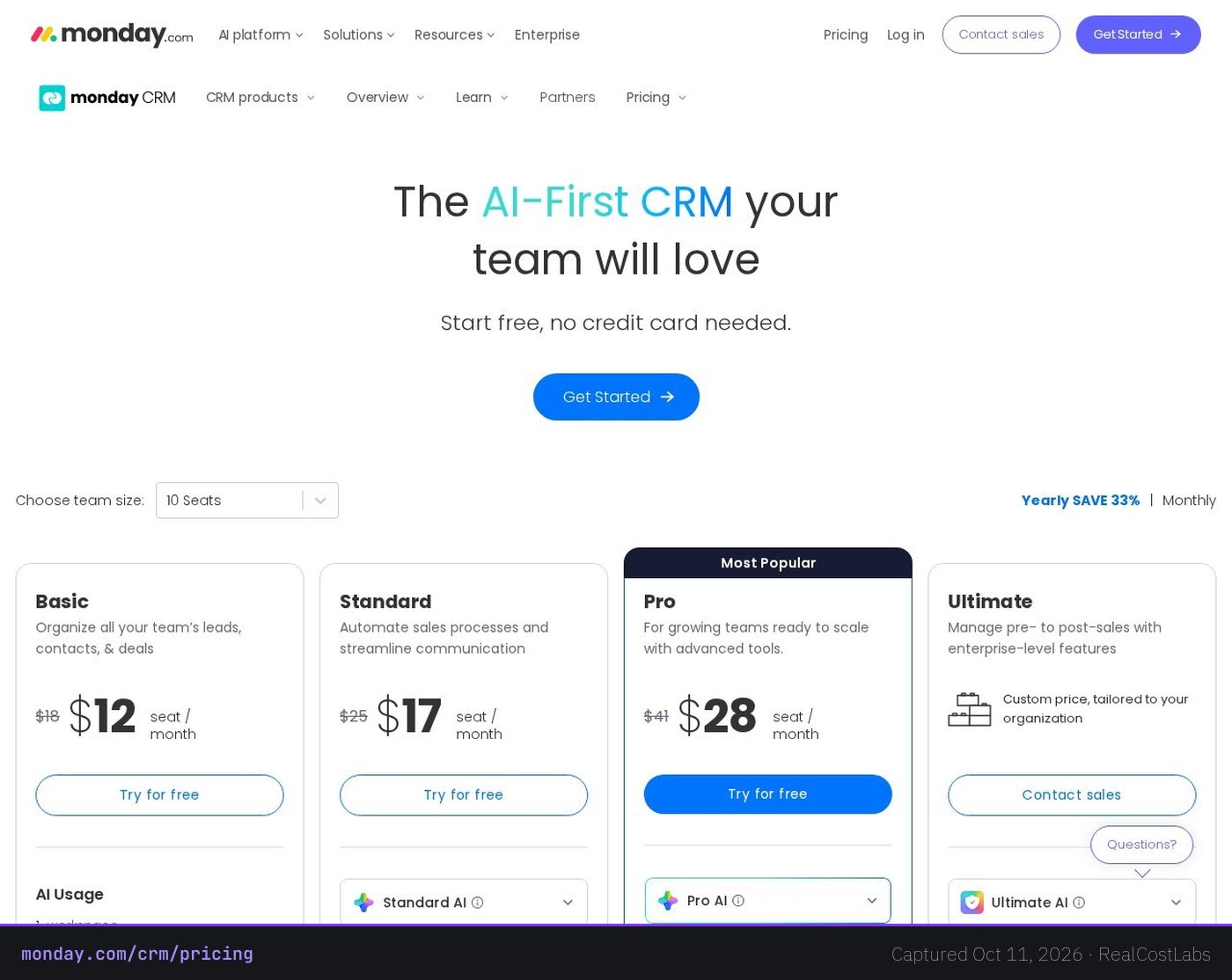
| monday CRM plan | Yearly /seat/mo (monthly) | Contacts & deals | Notable limits |
|---|---|---|---|
| Basic CRM | $12 ($18 monthly) | Up to 1,000 | 1 dashboard, 1 workspace, 20 quotes/invoices per mo, 5 columns per board. |
| Standard CRM | $17 ($25 monthly) | 10,000 | 250 automations/mo, 5 dashboards, 3 workspaces, 50 quotes/invoices, email tracking + 2-way sync. |
| Pro CRM | $28 ($41 monthly) | 100,000 | 25,000 automations/mo, 50 dashboards, 15 workspaces, 250 quotes/invoices, email sequences, sales forecasting. |
| Ultimate | Custom quote | Unlimited | Advanced lead scoring, team goals, tailored security. |
Value per seat is where the math bites. A 50-seat sales team pays $7,200 per year on Basic CRM, $10,200 per year on Standard CRM, and $16,800 per year on Pro CRM. At $28 per seat, Pro CRM sits in the mid-to-high band for the category, and the features sales teams reach for first (email sequences and sales forecasting) live up there on Pro. That is the practical reason Capterra buyers scored Value for Money 4.3, the platform’s weakest dimension. The product is good. The feeling that you are paying for the privilege, especially once the 3-seat floor and the paywalled tiers stack up, is real and it shows up in the data.
If your CRM need is a clean pipeline for a small team, monday CRM is pleasant to use and quick to set up. If you are price-sensitive at scale, the per-seat structure is the thing to model before you commit, because the bill grows in a straight line with headcount and there is no free tier to soften the landing.
Email and deliverability, the real picture
Buyers evaluating a CRM almost always ask the same question: can I send email from it, and will it land? With monday CRM the answer has an important asterisk. monday does not publish a deliverability percentage, and more to the point, it does not control your sending limits. When you connect a Gmail or Outlook mailbox, the sending caps are enforced by that mailbox, not by monday. monday states plainly that it cannot override those quotas, and it points high-volume senders to a separate product, monday Campaigns, which is an add-on on Pro and Enterprise.
The deliverability controls that serious senders care about (a dedicated IP with automatic warmup, SPF, DKIM and DMARC alignment, and BIMI/VMC for verified logos) exist only on the Enterprise tier of monday Campaigns. On Enterprise, Campaigns also lifts your monthly send volume to 15x your contact count. For day-to-day CRM sending, monday’s mass-email tool does report a delivery rate percentage and a unique open rate percentage per send, so you can see how a given blast performed. But if your plan is to push high-volume outbound from the CRM itself, understand the model first: monday is the interface, your mailbox is the gatekeeper, and true deliverability tooling lives behind the Enterprise Campaigns paywall. For a sales team sending dozens of one-to-one emails a day, this is a non-issue. For a marketing team planning thousands of sends, it is a budgeting decision you want to make before you sign.
Features, in depth
The thing monday.com does better than almost anyone is make work visual. Boards are color-coded and easy to read at a glance, and you can flip the same data between Kanban, Gantt and timeline, calendar, map, chart, and workload views without rebuilding anything. For teams that think in pictures rather than rows, this is the feature that earns the loyalty behind those G2 and Capterra scores.
- No-code automation and integration recipes. You build automations from plain-language recipes (when this happens, do that) and connect outside tools the same way. Both are metered per plan: Standard gives you 250 automation and 250 integration actions a month, Pro jumps to 25,000 of each, and Enterprise to 250,000. The metering matters, because a busy board can burn through the Standard allowance faster than you expect.
- Cross-board dashboards. Real-time dashboards pull widgets across multiple boards so leadership sees status without opening every project. The number of widgets you can stack scales with your tier, so the higher plans get richer reporting.
- Native AI. monday includes AI credits by tier (1,000 on Basic up to 20,000 on Enterprise) and ships official integrations with Claude, Copilot, and ChatGPT, plus a monday MCP server and AI agents. This is a current, actively built area rather than a bolt-on.
- One platform, four products. Work Management, CRM, dev, and service share one account and one visual language. If you want a single vendor across project work and sales, that consolidation is a real argument in monday’s favor.
There are sharp edges, and they are worth naming because they show up in real 2026 reviews rather than in marketing copy. WorkForms, monday’s form tool, can only create new items, not update existing ones. Send a client a form to update their record and you get a duplicate item instead, which is a genuine workflow trap for anyone using forms to collect ongoing updates. The mobile app is also clearly weaker than the desktop experience and lacks equivalent dashboard views, so monday is a desk-first tool in practice.
Ease of use
For everyday work, monday.com is approachable. The visual boards lower the barrier for non-technical teammates, and the automation recipes are written in human language rather than logic syntax. That ease is exactly what Capterra’s 4.5 Ease of Use sub-score and G2’s 9.1 out of 10 on the same dimension are measuring.
The friction shows up in two places. The first is the initial learning curve: a Work OS is more flexible than a simple to-do app, and that flexibility means first-time users face more choices about how to structure boards. The second, and more serious, is performance at scale. Large boards with many items, many connected boards, and many automations slow down noticeably. monday is smooth on a normal-sized workspace and gets sluggish on a very large one, so plan your board architecture with that ceiling in mind rather than piling everything into one giant board.
Who it is for
monday.com is a strong fit for visual teams of roughly five to a few hundred people who want one flexible platform across projects and, optionally, sales. It rewards teams that will actually use automations, dashboards, and multiple view types, because that is where the per-seat price converts into saved time. It fits managers who want at-a-glance status across many workstreams, and organizations that prefer one vendor over a stack of point tools.
It is a weaker fit for solo operators and two-person shops, who pay the 3-seat tax for a full Work OS they may not need. It is a weaker fit for buyers whose first priority is the lowest price per seat at scale, given the mid-to-high CRM pricing and the paywalled feature tiers. And it is a weaker fit for anyone who needs a phone-first tool or who plans to run high-volume outbound email from the CRM without budgeting for Enterprise Campaigns.
Three real-world scenarios
The two-person agency
You and a partner run client projects. The Free plan (2 seats) covers basic boards and Docs, but the moment you want an automation or a Slack integration you have to move to a paid plan, and the paid plan bills you for three seats even though there are two of you. Budget about $324 a year for Basic, accept that you are paying for a phantom third seat, and decide whether the visual boards are worth it versus a cheaper tool built for small teams.
The 25-person marketing team
You want timeline views, dashboards across campaigns, and enough automation headroom to not think about it. That is Pro, at $5,700 per year for 25 seats. Standard would save you $2,100 a year but caps automations at 250 actions a month, which a 25-person team will blow through, and it lacks the chart view and time tracking you will want. This is the classic monday upgrade pressure: the plan that fits the team is a tier above the plan that fits the budget.
The 50-rep sales org on monday CRM
You need email sequences, sales forecasting, and room for 100,000 contacts. That is Pro CRM, at $16,800 per year for 50 seats. It works well and consolidates sales into the same platform as your project work. The watch-outs are the per-seat cost as you add reps and the email model: high-volume sending runs through your connected mailboxes or the separate Campaigns add-on, not the CRM’s base tier.
monday.com vs the alternatives
monday.com competes with different tools depending on which job you are buying it for. For work management, the most common cross-shops are ClickUp, Asana, and Smartsheet. For CRM, they are HubSpot, Zoho, and Pipedrive.
| Tool | Best at | Free tier | Where it beats monday |
|---|---|---|---|
| monday.com | Visual Work OS + CRM in one | Yes (2 seats, limited) | Breadth, views, polish |
| ClickUp | Deep customization | Generous | More features per dollar, no 3-seat tax |
| Asana | Clean task management | Yes | Simpler, lighter learning curve |
| Smartsheet | Spreadsheet-style at scale | Limited | Strong automation for large enterprises |
| HubSpot | Marketing + sales suite | Yes, free CRM | Free CRM tier, deeper marketing tools |
If your priority is the most capability per dollar and a generous free tier, ClickUp is the head-to-head to run. If you want cleaner, simpler task management without the Work OS learning curve, Asana is the lighter option. And if your real need is CRM, HubSpot deserves a look first, because its free CRM tier removes the exact friction (no free plan, a 3-seat floor) that drags monday CRM’s value score down. monday.com wins when you genuinely want the visual platform and the four-products-in-one consolidation. It loses when the deciding factor is price, where rivals with free tiers and no seat minimum simply start cheaper.
Pros and cons
- Pro: Excellent independent product scores (G2 4.7 across 15,127 reviews, Capterra 4.6 across 6,054).
- Pro: The most visual, view-rich work platform in the category, with 8+ view types on one dataset.
- Pro: No-code automations and 850+ integrations, plus current native AI (Claude, Copilot, ChatGPT, monday MCP).
- Pro: One account spans work management, CRM, dev, and service.
- Pro: 24/7 support is offered, and Enterprise adds a 99.9% uptime SLA.
- Con: 3-seat minimum on every paid plan penalizes solos and duos by roughly $216 a year.
- Con: Value for Money is the lowest Capterra sub-score (4.3); useful features sit on the higher tiers.
- Con: Trustpilot 2.5 (“Poor”) driven by billing, auto-renewal, and hard-to-reach human support.
- Con: Performance slows on large boards; mobile app is weaker than desktop.
- Con: WorkForms create items but cannot update existing ones, which produces duplicates.
FAQ
Is monday.com worth the money?
For visual teams that will use automations, dashboards, and multiple views, yes: the product quality behind its 4.7 G2 and 4.6 Capterra scores is real. For solos, duos, or anyone whose top priority is the lowest cost per seat, the 3-seat minimum and the paywalled higher tiers make it a premium choice, which is why Capterra buyers rated value 4.3, its weakest dimension.
Why is monday.com rated 2.5 on Trustpilot but 4.7 on G2?
The two channels measure different things. G2 and Capterra draw software-reviewer audiences rating the product, and they score it highly. Trustpilot is an open consumer channel where unhappy customers report experiences, and monday’s complaints there cluster on billing, auto-renewal surprises, price hikes, and difficulty reaching a human in support. The product is well liked; the billing and support experience is where the company takes its hits.
Does monday.com have a free plan?
Work Management has a Free plan for up to 2 seats with up to 3 boards and no automations or integrations. monday CRM has no free-forever plan at all, only a 14-day free trial (no card required is stated). The Work Management Free tier does not include CRM features.
What is the cheapest way to use monday.com?
The Free plan if two seats and basic boards are enough. Otherwise the cheapest paid entry is three seats of Basic on annual billing, which is $27 per month or $324 per year. There is no single-seat paid plan, so even a solo pays for three seats.
How much does monday.com cost for a real team?
On Work Management Standard, 10 seats is $1,440 per year and 25 seats is $3,600 per year. On Pro, the same teams are $2,280 and $5,700 per year. On monday CRM, monthly billing costs $18, $25 or $41 per seat against $12, $17 or $28 yearly, 46 to 50 percent more. monday CRM Pro for a 50-seat team is $16,800 per year.
Can monday CRM send marketing email, and will it land?
You can send email from monday CRM, but your sending limits are set by the connected Gmail or Outlook mailbox, not by monday, and monday cannot override those caps. Real deliverability tooling (dedicated IP with auto-warmup, SPF/DKIM/DMARC, BIMI/VMC) lives only on the Enterprise tier of the separate monday Campaigns add-on. The base CRM does report delivery and open rate percentages per send.
How many integrations does monday.com have?
850+ integrations and apps through the official marketplace, which serves 225,000+ customers. Major connectors include Slack, Microsoft Teams, Gmail, Outlook, Salesforce, HubSpot, Zoom, Jira, GitHub, QuickBooks, and Stripe, with thousands more reachable via Zapier or Make. Some older third-party reviews still cite an outdated “40+” figure; the current official number is 850+.
What are the best monday.com alternatives?
For work management, look at ClickUp (more customization and a generous free tier), Asana (cleaner, simpler tasks), and Smartsheet (spreadsheet-style with strong enterprise automation). For CRM, look at HubSpot (free tier plus deeper marketing and sales), Zoho CRM (cheaper at scale), and Pipedrive (pipeline-focused).
KEEP EXPLORING
Ready to try monday.com?
Strong on capability, premium on price. Start free or trial it, and model the per-seat cost before you commit.
Try monday.com →RealCostLabs is independent and reader-supported. We may earn a commission on purchases made through our links, at no extra cost to you, and our scores are never for sale.