 MailerLite
 ActiveCampaign
 Omnisend
 Klaviyo
 SE Ranking
 Mangools
 Semrush
 Ahrefs
 Pipedrive
 Zoho CRM
 Salesforce
 HubSpot
 Systeme.io
 GoHighLevel
 ClickFunnels
 Vendasta
Mailchimp review
The easiest, most recognized all-in-one marketing platform, and the one that charges you the most as your list grows.
Ratings from G2 (~12,885 reviews), Capterra (17,626) and Trustpilot (2.6, ~1,290 to 1,440 reviews), pricing verified October 11, 2026.
The verdict
Mailchimp is the email tool with the widest name recognition, and there is a good reason for that. It has the most polished drag-and-drop editor in the category, hundreds of templates that hold up on mobile, a free website builder and landing pages bundled in, and a marketplace of 300-plus integrations that connect it to almost anything you already use. Business reviewers reward all of this: 4.3 out of 5 on G2 across roughly 12,885 reviews, and 4.5 on Capterra across 17,626. If your only question is whether Mailchimp is pleasant to use, the answer is yes. Plan-by-plan numbers, add-ons and real team bills are in our Mailchimp pricing 2026 breakdown.
The problem is what happens when you grow. Mailchimp bills you on your total number of stored contacts, including people who unsubscribed and people who never subscribed in the first place. A normal small-business list of about 5,000 contacts on the Standard plan (the tier Mailchimp markets hardest) costs $100 a month, roughly $1,200 a year, and the meter keeps climbing as your audience does. Phone support is locked behind the $350-a-month Premium plan. The free tier, already trimmed once, was cut again in February 2026 to 250 contacts and 500 sends a month. And on the one metric that defines this entire category, inbox delivery, Mailchimp now lands mid-pack at about 89.5 percent, seventh out of fifteen tools in independent testing.
That gap between how it feels and what it costs is exactly why consumer sentiment is so harsh. Trustpilot sits at 2.6 out of 5, with roughly 67 percent of reviews at one star, and the complaints cluster on three things: billing, surprise charges, and support you cannot reach. Our thesis at RealCostLabs is that the cheapest tool that does the job is usually the one people end up happiest with. Mailchimp is capable and easy, but it is not cheap, and it is not the most satisfying once the invoices start growing. It earns a 6.8: a genuinely good product held back by a pricing model that punishes the success it is supposed to help you create.
What Mailchimp really costs at scale
The short version is below. For the plan-by-plan detail, the full add-on table and the ways to pay less, see our dedicated Mailchimp pricing breakdown.
Mailchimp has four plans: Free, Essentials, Standard, and Premium. All paid plans are priced by your total contact count, and there is no standard annual prepay discount on the marketing plans, so the monthly number is the number you live with. Verified nonprofits can get 15 percent off with documentation. Here is what the marketing tiers actually cost as your list grows.
| Contacts | Essentials | Standard | Premium |
|---|---|---|---|
| 500 | $13/mo | $20/mo | n/a |
| 5,000 | $75/mo | $100/mo | n/a |
| 10,000 | $110/mo | $135/mo | $350/mo |
| 25,000 | $270/mo | $310/mo | $620/mo |
| Max contacts | 50,000 | 100,000 | 200,000+ |
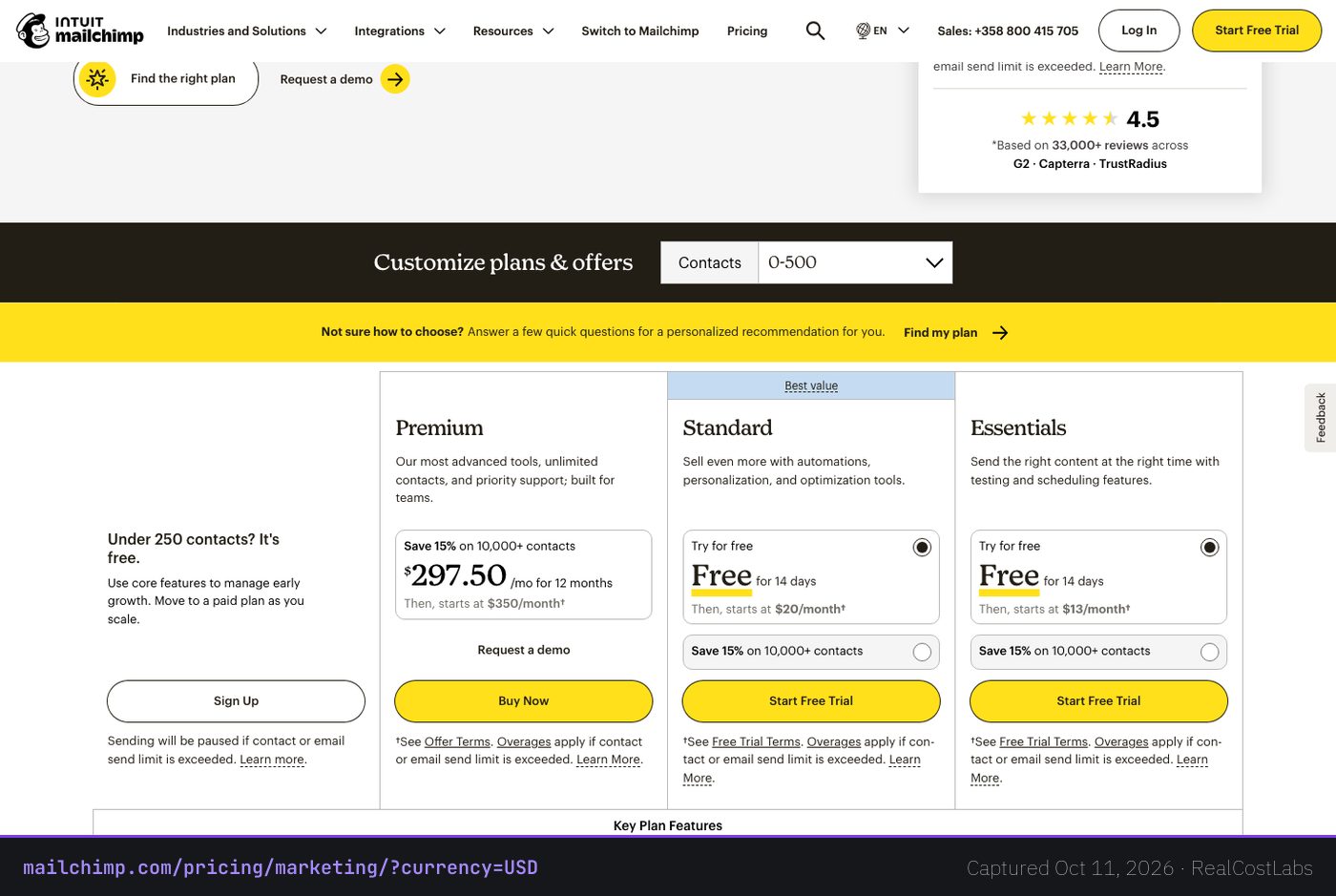
The headline number on those plans is the optimistic one. The real cost runs higher, and here is why. You are billed on every contact stored in your audience, not just the people who can actually receive your email. Unsubscribed contacts count. Non-subscribed contacts count. The only people who do not count are the ones you manually archive or delete. So a list that looks like 5,000 active subscribers in your head can easily be 6,000 or 7,000 billable contacts in your account, which quietly pushes you up a price band. If you keep the same person in two different audiences, they are billed twice.
Put plainly: the most-marketed plan, Standard at a realistic 5,000 contacts, is $100 a month, about $1,200 a year, before any of the contact bloat above. Essentials at the same 5,000 is $75 a month, roughly $900 a year, but Essentials caps automations at four steps, so a growing sender is pushed toward Standard anyway. SMS is a separate paid add-on starting around $20 a month, and there are no native push notifications. None of these are scandals on their own. Stacked together, they are why billing sits at the center of Mailchimp’s one-star Trustpilot reviews (2.6 out of 5, roughly 67 percent one-star).
It is also worth noting what is not on offer. There is no standard annual prepay discount on the marketing plans, so unlike many subscription tools you cannot lock in a lower rate by paying for a year up front. The only built-in price break is the 15 percent nonprofit discount, and that requires documentation to verify. Premium, the top tier, starts at 10,000 contacts and stays flat at $350 a month up to that ceiling, which makes it look reasonable at 10,000 but expensive at the 500-contact end where it is simply unavailable. The pattern across all of this is consistent: Mailchimp’s pricing rewards staying small and penalizes the growth it is built to support.
Deliverability: the metric that matters most
For an email platform, nothing else counts if your campaigns land in spam. This is the core performance dimension of the category, and it is where Mailchimp has slipped. In EmailToolTester’s latest 2026 testing, Mailchimp reached about 89.5 percent deliverability and ranked seventh out of fifteen tools, earning 3 out of 5 stars on deliverability tooling. That is not bad, but it is squarely mid-pack, and it is a notable step down from the reputation Mailchimp carried for years.
Two things are worth understanding here. First, EmailToolTester changed its methodology in 2025 to score providers on the inbox-improvement tools and features they offer rather than on pure seed-list inbox placement, and that shift is part of why Mailchimp’s measured performance came down. Second, an 89.5 percent inbox rate means that for every 1,000 emails you send, roughly 105 are not making it to the primary inbox. At a 5,000-contact list, that is a few hundred people per send who may never see the campaign you paid to deliver. Mailchimp does include built-in reputation monitoring and benchmarking to help, but the raw result puts it behind the tools that treat deliverability as their headline feature.
The practical takeaway is to weigh deliverability against price together rather than separately. Paying a premium for an easy editor is a defensible choice. Paying that premium while a tenth of your sends miss the inbox is harder to justify, especially when two of Mailchimp’s closest competitors are both cheaper at scale and rate higher on inbox placement. For senders whose revenue depends directly on email reaching people, this single number should carry more weight than the template gallery or the integration count.
Features, in depth
Where Mailchimp earns its reputation is breadth and polish. The feature set is genuinely wide for an all-in-one platform, and the editor in particular is the one most competitors are measured against.
- Email editor and templates: the drag-and-drop builder is the smoothest in the category, backed by hundreds of mobile-responsive templates that look professional without design work.
- Landing pages and a free website builder: both are bundled in, so you can capture signups and host simple pages without a separate tool.
- AI and creative assistant tools: generative helpers for copy, layout, and creative are built into the workflow.
- Audience management and CRM: contact profiles, tags, and behavioral segmentation let you target by what people actually do, though advanced segmentation is gated to higher tiers.
- Reporting and benchmarking: campaign analytics plus industry benchmarks so you can see how your opens and clicks compare.
- Automation: capable on Standard (around 200 steps), but capped at just four steps on Essentials, which is the single biggest reason to skip the cheaper paid plan.
The gating is the catch. A/B testing, advanced segmentation, and deep automation all live on Standard and above. SMS is an extra paid add-on, and there is no native push. So the feature list looks complete from a distance, but the parts that drive real marketing results sit on the more expensive tiers.
Ease of use
This is Mailchimp’s strongest card and it is not close. G2 reviewers score it 8.7 out of 10 for ease of use across more than 11,000 ratings, and Capterra puts ease of use at 4.4. The onboarding is friendly enough that someone who has never sent a marketing email can build and ship a decent campaign in an afternoon, and Standard and Premium include a dedicated onboarding specialist free for the first 90 days. If the team using the tool is non-technical, Mailchimp lowers the barrier more than almost anything else in the category.
The friction shows up later, in two places. Quality of support scores 8.0 on G2 and 4.2 on Capterra, both clearly below the ease-of-use marks, and reaching a human is hard on the lower tiers. And the billing model, as covered above, is not something the clean interface protects you from. The product is easy; the bill is not.
Who it is for
Mailchimp makes the most sense for a specific kind of user: a small business or solo marketer with a modest list, a real need for the website builder and landing pages, and a strong preference for the easiest possible tool over the cheapest one. If you value a polished editor and 300-plus integrations more than you mind paying a premium as you grow, it fits.
It makes the least sense if your list is already large or growing fast, if you are cost-sensitive, if you keep a lot of unsubscribed or duplicate contacts around, or if deliverability is the thing you obsess over. In those cases the contact-based pricing and the mid-pack inbox rate work against you, and a send-volume or automation-first competitor will usually serve you better for less.
Three real-world scenarios
The 500-contact newsletter starter
At 500 contacts, Mailchimp is genuinely reasonable: Essentials is $13 a month, Standard is $20. The 2026 free plan, now just 250 contacts and 500 sends a month with email support only for the first 30 days, is too thin to rely on, so budget for a paid plan. At this size the easy editor is worth the modest cost, and the bill is not yet a problem.
The 5,000-contact small business
This is the scenario that defines Mailchimp. On Standard you are at $100 a month, about $1,200 a year, and contact bloat from unsubscribed and duplicate records can quietly push you higher. The automation and segmentation you want live on this tier, so you cannot easily drop to the $75 Essentials plan. This is the point to price out alternatives.
The 25,000-contact scaling team
At 25,000 contacts the math turns sharp: Standard is $310 a month and Premium, the only tier with phone support, is $620. That is roughly $3,720 to $7,440 a year, and the per-contact model means the next growth milestone costs more again. Teams at this size are the natural candidates for volume-based pricing, which stops them paying for contacts who never open an email.
Mailchimp vs the alternatives
Mailchimp’s weaknesses map almost perfectly onto its main rivals’ strengths, which makes the comparison straightforward.
| Tool | Pricing model | Best at | Trade-off vs Mailchimp |
|---|---|---|---|
| Mailchimp | Per total contact | Ease of use, integrations | Costs more as you grow |
| ActiveCampaign | Per contact | Automation depth, deliverability | Steeper learning curve |
| Brevo | Per send volume | Cheaper at scale, includes SMS | Fewer templates and integrations |
| MailerLite | Per subscriber | Price, clean UI, free tier | Fewer advanced features |
If automation and inbox placement are your priorities, ActiveCampaign is the natural upgrade target, with deeper workflows and stronger reported deliverability. If you want to stop paying for stored contacts, Brevo charges by send volume rather than contact count, which gets cheaper at scale and bundles SMS in. And if you simply want most of what Mailchimp does for less money with a cleaner interface and a more generous free tier, MailerLite is the direct head-to-head. For Shopify-heavy e-commerce, Klaviyo and Omnisend are also worth a look, though they sit outside Mailchimp’s general-purpose lane.
Pros and cons
Pros
- The easiest tool in the category, with the best drag-and-drop editor and hundreds of responsive templates.
- 300-plus native integrations plus an open marketing API.
- Bundled landing pages and a free website builder.
- High business-reviewer ratings: G2 4.3, Capterra 4.5, with an 8.7 ease-of-use score.
- Free onboarding specialist for 90 days on Standard and Premium.
Cons
- Per-contact pricing that bills unsubscribed and duplicate contacts and gets expensive as you grow.
- Standard runs about $100 a month at 5,000 contacts, roughly $1,200 a year.
- Phone support locked to the $350-a-month Premium plan.
- Mid-pack deliverability: about 89.5 percent, seventh of fifteen tools tested.
- Free tier cut to 250 contacts and 500 sends a month in February 2026.
- Poor consumer sentiment: Trustpilot 2.6, about 67 percent one-star reviews.
FAQ
How much does Mailchimp actually cost?
For a typical 5,000-contact list on Standard, the most-marketed tier, it is $100 a month, about $1,200 a year. Essentials at the same size is $75 a month, roughly $900 a year, but caps automation at four steps. The real cost can run higher because you are billed on total contacts, including unsubscribed and non-subscribed ones (Mailchimp’s own pricing help page spells this out).
Why is my Mailchimp bill higher than the plan price?
Because pricing is based on your total stored contacts, not just active subscribers. Unsubscribed and non-subscribed contacts are billed, and the same person stored in two audiences is billed twice. Only contacts you manually archive or delete are excluded.
Is the Mailchimp free plan still worth using?
Much less than it used to be. As of February 17, 2026, the free plan dropped to 250 contacts and 500 sends a month, with a 250-per-day send cap and email support only for the first 30 days. It is fine for testing, but a real sender will outgrow it quickly.
How good is Mailchimp’s deliverability?
Mid-pack. Independent 2026 testing put it at about 89.5 percent, seventh out of fifteen tools, with 3 out of 5 stars on deliverability tooling. That means roughly 105 of every 1,000 emails may not reach the primary inbox.
Does Mailchimp offer phone support?
Only on the Premium plan, which starts at $350 a month. Essentials and Standard get 24/7 email and chat but no phone. The free plan gets email support for the first 30 days only.
Why is Mailchimp’s Trustpilot score so low if G2 likes it?
It reflects two different audiences. Business and admin reviewers on G2 (4.3) and Capterra (4.5) reward the ease of use and feature breadth. Consumers on Trustpilot (2.6, about 67 percent one-star) concentrate on billing surprises, rising costs, and hard-to-reach support.
What are the best Mailchimp alternatives?
ActiveCampaign for deeper automation and stronger deliverability, Brevo for send-volume pricing that is cheaper at scale and includes SMS, and MailerLite for a lower price with a cleaner interface and a more generous free tier. Klaviyo and Omnisend are strong for Shopify e-commerce.
Does Mailchimp include SMS and automation?
Automation is included but capped at four steps on Essentials and expands to around 200 steps on Standard. SMS is a separate paid add-on starting around $20 a month, and there are no native push notifications.
KEEP EXPLORING
Ready to try Mailchimp?
Start free, but watch the contact count: that is where the real cost lives.
Try Mailchimp →RealCostLabs is independent and reader-supported. We may earn a commission on purchases made through our links, at no extra cost to you, and our scores are never for sale.