 MailerLite
 ActiveCampaign
 Omnisend
 Klaviyo
 SE Ranking
 Mangools
 Semrush
 Ahrefs
 Pipedrive
 Zoho CRM
 Salesforce
 HubSpot
 Systeme.io
 GoHighLevel
 ClickFunnels
 Vendasta
GetResponse review
The rare email tool that also runs your webinars, funnels and courses, priced so the bill climbs faster than your list.
Ratings from G2 (1,116 reviews), Capterra (524) and Trustpilot (~4.0, ~955 to 1,006 reviews), pricing verified October 11, 2026.
The verdict
GetResponse is one of the few email platforms that genuinely deserves the phrase all-in-one. Most tools that claim it bolt a landing-page builder onto an email editor and call it a suite. GetResponse goes further: built-in webinars, live and on-demand, an online-course creator for up to 500 students, conversion funnels, a website builder, signup forms and popups, web push notifications, and AI generators for emails and pages. The webinar piece in particular is rare. Almost no email tool ships it natively, and for a coach, course seller or B2B marketer who would otherwise pay separately for a webinar platform, that one feature can justify the whole subscription. Plan-by-plan numbers, add-ons and real team bills are in our GetResponse pricing 2026 breakdown.
The reviews back up a solid, mature product. GetResponse holds 4.3 out of 5 on G2 across 1,116 reviews, 4.2 on Capterra across 524, and roughly 4.0 on Trustpilot across about a thousand. Quality of support scores a strong 8.5 out of 10 on G2, and 24/7 live chat is included on every paid plan, including the cheapest one. This is not a thin tool dressed up with marketing. It is a wide one, and most of the width works.
The catch is what you pay as your list grows. GetResponse prices by contact-list size, and the climb is steep: a Marketer plan that starts at $59 a month for 1,000 contacts is $169 a month at 10,000, roughly $2,028 a year. Worse, the billing model charges on your peak contact count in a cycle, so a temporary spike can bump you up for the whole period, and the same person on two lists is counted twice. On the one number that decides email ROI, inbox placement, GetResponse lands solid but mid-pack. Our thesis at RealCostLabs is that the cheapest tool that does the job is usually the one people stay happiest with. GetResponse is more capable than most of the category, which is why it earns an 8.3, but it is not the cheapest, and the pricing model is the single thing keeping it out of the top tier.
What GetResponse really costs at scale
The short version is below. For the plan-by-plan detail, the full add-on table and the ways to pay less, see our dedicated GetResponse pricing breakdown.
GetResponse has four plans: Starter, Marketer (the one it markets hardest), Creator, and Enterprise, which was previously called MAX. You can pay monthly, annually for about 18 percent off, or every two years for roughly 30 percent off. Every paid plan is priced by your contact-list size, so the number you sign up at is not the number you live with for long. Here is what the two mainstream plans, Starter and Marketer, cost on monthly billing as a list grows.
| Contacts | Starter | Marketer |
|---|---|---|
| 1,000 | $19/mo | $59/mo |
| 2,500 | ~$29/mo | $79/mo |
| 5,000 | ~$54/mo | $99/mo |
| 10,000 | ~$79/mo | $169/mo |
| 25,000 | $169/mo | $299/mo |
| 50,000 | $299/mo | $499/mo |
| 100,000 | $499/mo | $699/mo |
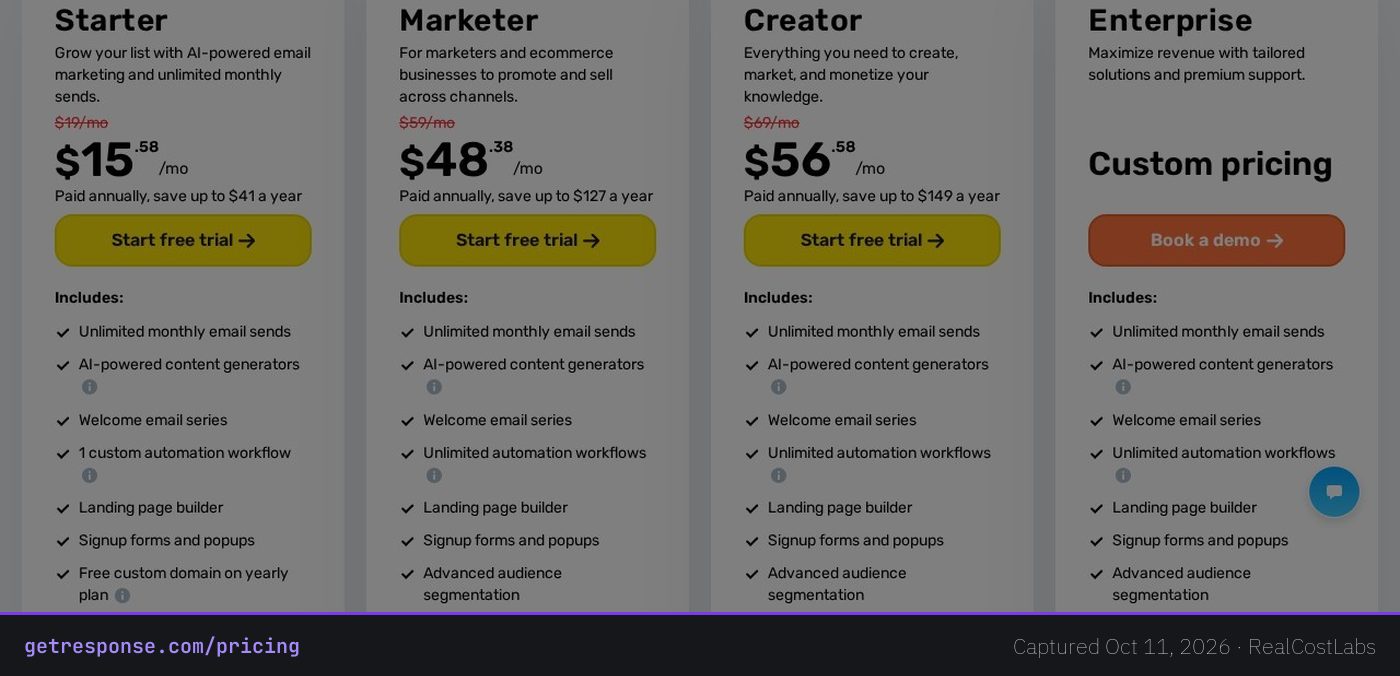
Spelling out the real annual cost matters here, because the entry price hides it. At 1,000 contacts the Marketer plan is $59 a month, about $708 a year, or roughly $48 a month if you prepay annually. That looks fine. But the most realistic small-business scenario is a 10,000-contact list, and on Marketer that is $169 a month, about $2,028 a year. Prepay annually and the effective rate drops to roughly $88 a month, about $1,056 a year, so the annual commitment nearly halves the bill but locks your money up front. Starter is cheaper at every tier, around $79 a month at 10,000 contacts, but it gives you exactly one automation workflow, the catch we cover below. Creator, the plan with webinars and the course tools, runs about $101 a month at 10,000 contacts on annual billing, roughly $1,212 a year.
Two billing details deserve a clear warning. First, pricing is based on your peak contact count during a billing cycle, not your average. If you import a list, run a one-time campaign, and prune it back down, the spike can still bump you into a higher price band for the entire cycle. Second, the same contact stored on more than one list is counted more than once: a subscriber on both your newsletter list and your customer list is two contacts as far as the meter is concerned. GetResponse’s own pricing help page documents both, and together they are why a GetResponse account can cost more than the table above suggests.
The Enterprise tier, formerly MAX, is quote-only and sold through a demo. It adds a dedicated sending IP, single sign-on, SMS, mobile push, transactional email, AI product recommendations, unlimited users and a dedicated customer experience manager. One published source put its starting point at around $1,099 a month for lists above 100,000 contacts, so it is aimed at large senders, not something a small team grows into casually. For a small team the comparison that matters is Starter against Marketer, and the question is whether you need more than one automation.
Deliverability: the metric that matters most
For an email platform, nothing else counts if your campaigns land in spam. This is the core performance dimension of the category, and it is where GetResponse is solid without being a leader. EmailToolTester rates it 3.5 out of 5 stars on deliverability. As of its 2025 to 2026 testing, EmailToolTester moved to a feature-based methodology, scoring providers on authentication setup, bounce and complaint suppression, a dedicated deliverability team and assisted IP warmup, rather than publishing a single inbox percentage for GetResponse. Their note is encouraging in one specific way: GetResponse emails were much less likely to be marked as spam than many rivals.
For a hard number, a separate inbox-placement test of 65,810 emails put GetResponse at 77.63 percent in the inbox, with 20.22 percent landing in spam or promotions and 2.15 percent missing entirely. A different aggregator snapshot cited a more flattering 82.62 percent main-inbox rate. Treat the range, roughly 78 to 83 percent in the primary inbox, as realistic. At the lower end, for every 1,000 emails you send, around 200 may not reach the primary inbox, a meaningful tax on a campaign you paid to deliver, and the gap between GetResponse and the tools that lead this metric.
One number to set aside is GetResponse’s own marketing claim of 99 percent deliverability. That is a vendor figure, not an independent test, and it should not anchor your expectations. In short, GetResponse sits mid-pack on inbox placement: behind category leaders such as ActiveCampaign and MailerLite in EmailToolTester’s rankings, but not in the problem zone. If your revenue depends directly on email arriving, weigh this against the price. If your priority is the webinar and funnel stack rather than the last few points of inbox rate, mid-pack deliverability is an acceptable trade.
Features, in depth
Breadth is the reason to look at GetResponse, and the breadth is real. This is closer to a marketing operating system than an email tool, and the parts beyond email are not afterthoughts.
- Email and AI generation: unlimited sends on every paid plan, plus AI email and landing-page generators and autoresponders, available even on Starter.
- Marketing automation: a visual workflow builder with segmentation, tagging and abandoned-cart recovery. The catch is that Starter allows only one workflow, and unlimited workflows start on Marketer.
- Landing pages, forms and popups: included from Starter up, with signup forms and popups for list growth.
- Conversion and sales funnels: prebuilt funnels with promo codes and unlimited web push on Marketer and above.
- Webinars: live and on-demand webinars built directly into the platform on Creator and up. This is the genuine differentiator, since almost no rival email tool includes it.
- Website builder and course creator: a website builder plus an online-course suite for up to 500 students, also on Creator, which turns GetResponse into a real option for course sellers.
- Enterprise additions: SMS, mobile push, transactional email and AI product recommendations, reserved for the quote-only Enterprise tier.
The gating is the thing to read carefully. The features that make GetResponse special split across three tiers. Serious automation, funnels and unlimited web push are on Marketer. Webinars, the website builder and the course creator are on Creator. SMS, transactional email and product recommendations are on Enterprise. So the suite looks complete from a distance, but you cannot get all of it on one mid-range plan. You pick the tier that holds the tool you came for, which is why matching plan to use case matters more here than with simpler competitors.
Ease of use
GetResponse rates as approachable overall, with a few rough edges. G2 reviewers give it 8.2 out of 10 for ease of use, and Capterra puts ease of use at 4.0. The core email and landing-page workflows are straightforward, the AI generators lower the blank-page barrier, and a non-technical user can build and send a campaign without much training. For day-to-day sending, it is a comfortable tool.
The friction shows up in the advanced automation builder, which carries a learning curve, the predictable cost of its depth: the conditional logic and segmentation that make it powerful also make the first complex workflow harder to assemble. That is not a dealbreaker, but it is a counterweight to an otherwise easy product, and it explains why the ease-of-use scores sit a notch below the category’s simplest tools.
Who it is for
GetResponse makes the most sense for a specific buyer: someone who wants email plus the surrounding stack in one place, and who will actually use the webinar, funnel or course tools rather than just the email. A coach selling courses, a B2B marketer running webinar-led lead generation, or a small business that wants funnels and pages without stitching together four subscriptions will get real value from the bundle. The included 24/7 live chat on every paid plan is a genuine plus for a team without a dedicated marketing operations person.
It makes the least sense if you only need email and automation, if your list is large or growing fast, or if deliverability is the thing you obsess over. In those cases you are paying for breadth you will not touch while the contact-based pricing climbs against you, and a cheaper subscriber-based or send-based competitor with stronger inbox placement will usually serve you better for less. The peak-contact and duplicate-counting billing also punishes anyone who imports and prunes large lists.
Three real-world scenarios
The 1,000-contact course creator
This is GetResponse at its best. On Creator you get email, funnels, the website builder, the course tool for up to 500 students, and built-in webinars, all in one subscription. At 1,000 contacts that is around $56 a month on annual billing. Replacing a separate webinar platform and course host alone can cover the cost, so the all-in-one math works in your favor here rather than against you.
The 10,000-contact small business
This is the scenario that exposes the pricing. On Marketer, 10,000 contacts is $169 a month on monthly billing, about $2,028 a year, dropping to roughly $88 a month, about $1,056 a year, if you prepay annually. The automation and funnels you want live on this tier, so you cannot easily fall back to Starter and its single workflow. This is the point to compare GetResponse against cheaper rivals.
The 50,000-contact scaling sender
At 50,000 contacts the meter turns sharp: Starter is $299 a month and Marketer is $499. That is roughly $3,588 to $5,988 a year, and the peak-contact billing means a single large import can bump you for the whole cycle. Senders at this size are exactly the ones who price out send-volume-based tools to stop paying for stored contacts who never open an email, or who move to a quote on the Enterprise tier for a dedicated IP.
GetResponse vs the alternatives
GetResponse’s strengths and weaknesses map cleanly onto its rivals, which makes the comparison straightforward. Its bundle of webinars, funnels and courses is its wedge against all of them; its pricing model is where they fight back.
| Tool | Pricing model | Best at | Trade-off vs GetResponse |
|---|---|---|---|
| GetResponse | Per contact | Webinars, funnels, courses in one tool | Costs climb fast, peak-contact billing |
| ActiveCampaign | Per contact | Deeper automation, higher deliverability | Steeper learning curve, no webinars |
| Brevo | Per send volume | Cheaper at scale, includes SMS | Fewer built-in tools, no webinars |
| MailerLite | Per subscriber | Price, ease, top-tier deliverability | Fewer advanced and bundled features |
If automation depth and inbox placement are your priorities, ActiveCampaign is the first alternative to check, with a more capable workflow builder and stronger reported deliverability, though it has no native webinars. If you want to stop paying for stored contacts, Brevo charges by send volume rather than contact count, which gets cheaper at scale and bundles SMS in. And if you mainly want clean, cheap email with the best inbox placement in the category, MailerLite is the value alternative. The pattern is consistent: rivals beat GetResponse on price, deliverability or simplicity one at a time, but none of the three match its webinar-plus-course-plus-funnel bundle in one subscription.
Pros and cons
Pros
- A true all-in-one: email, automation, landing pages, funnels, website builder, courses, and built-in webinars in one tool.
- Webinars are native, which is rare among email platforms and can replace a separate subscription.
- 24/7 live chat on every paid plan, including the $19 Starter, with a strong 8.5 out of 10 G2 support score.
- Solid independent ratings: G2 4.3 across 1,116 reviews, Capterra 4.2, Trustpilot around 4.0.
- A permanent free plan (500 contacts, 2,500 sends a month) and a 14-day full-feature trial with no credit card required.
- 170-plus native integrations including Shopify, WooCommerce, WordPress, Salesforce and Stripe, plus Zapier and Make.
Cons
- Per-contact pricing that climbs steeply: Marketer is $169 a month at 10,000 contacts, about $2,028 a year on monthly billing.
- Peak-contact billing and duplicate-contact counting can push the bill above the plan price.
- The best automation and features are gated behind Marketer and above; Starter allows only one workflow.
- Deliverability is mid-pack, roughly 78 to 83 percent in the primary inbox, behind ActiveCampaign and MailerLite.
FAQ
How much does GetResponse actually cost?
For a realistic 10,000-contact list on Marketer, the most-marketed tier, it is $169 a month, about $2,028 a year, dropping to roughly $88 a month if you prepay annually. At 1,000 contacts Marketer is $59 and Starter is $19. The real cost can run higher because billing is based on your peak contact count in a cycle and counts the same person on two lists twice.
Why is my GetResponse bill higher than the plan price?
Because pricing is based on your peak contact count during a billing cycle, not your average, and the same contact stored on more than one list is counted more than once. A temporary spike from a one-time import can bump you into a higher price band for the whole cycle, even if you prune the list back down afterward.
Does GetResponse have a free plan in 2026?
Yes, and it is permanent with no time limit. The free plan covers 500 contacts and 2,500 email sends a month, plus one landing page with a 1,000-monthly-visitor cap and basic forms. There is also a separate 14-day free trial with full premium access and no credit card required.
How good is GetResponse’s deliverability?
Solid but mid-pack. EmailToolTester rates it 3.5 out of 5 stars and notes its emails were much less likely to be marked spam than many rivals. A hard test of 65,810 emails put it at about 77.63 percent in the inbox, while an aggregator cited 82.62 percent. Treat roughly 78 to 83 percent in the primary inbox as realistic. The vendor’s own 99 percent claim is marketing, not an independent test.
What makes GetResponse different from other email tools?
Its bundle. Beyond email and automation, GetResponse includes built-in live and on-demand webinars, an online-course creator for up to 500 students, funnels and a website builder, all in one subscription. Native webinars in particular are rare among email platforms, and that webinar-plus-course-plus-funnel stack is its main advantage over rivals like ActiveCampaign, Brevo and MailerLite.
Which GetResponse plan do I actually need?
It depends on the tool you came for. Starter ($19 at 1,000 contacts) covers email, landing pages and one automation. Marketer ($59) adds unlimited automation, funnels, segmentation and abandoned-cart recovery. Creator ($69) adds webinars, the website builder and the course creator. Enterprise, formerly MAX, is quote-only and adds a dedicated IP, SMS and transactional email. You cannot get every feature on one mid-range plan, so pick the tier that holds your use case.
Is GetResponse good for course creators and webinars?
Yes, this is one of its strongest fits. The Creator plan includes built-in webinars, both live and on-demand, plus an online-course tool for up to 500 students and a website builder. For a coach or course seller, replacing a separate webinar platform and course host can cover much of the subscription cost, which is where the all-in-one pricing works in your favor rather than against you.
What are the best GetResponse alternatives?
ActiveCampaign for deeper automation and stronger deliverability, Brevo for send-volume pricing that gets cheaper at scale and includes SMS, and MailerLite for a lower price with top-tier inbox placement and a clean interface. The trade-off in every case is that none of those three include GetResponse’s native webinars and course tools, so the right choice depends on whether you need that bundle or just clean email.
KEEP EXPLORING
Ready to try GetResponse?
Start on the free plan or the 14-day trial, and watch the contact count: that is where the real cost lives.
Try GetResponse →RealCostLabs is independent and reader-supported. We may earn a commission on purchases made through our links, at no extra cost to you, and our scores are never for sale.