 MailerLite
 ActiveCampaign
 Omnisend
 Klaviyo
 SE Ranking
 Mangools
 Semrush
 Ahrefs
 Pipedrive
 Zoho CRM
 Salesforce
 HubSpot
 Systeme.io
 GoHighLevel
 ClickFunnels
 Vendasta
Karbon pricing
$59 or $89 per user per month on annual billing — the cheapest credible entry in accounting practice management. But monthly billing is only available to teams of four or more, so the smallest firms are the ones locked into an annual commitment. And the price you see depends on where you are sitting.
RealCostLabs is independent and reader-supported. We earn no commission from Karbon, Canopy or TaxDome. Every figure was read from Karbon’s own pricing page at the USD setting, August 2026.
Check the currency selector first. Karbon’s pricing page defaults to your local currency, so a US buyer can land on Euro pricing without noticing. The figures below are the USD setting. Set it before you compare Karbon with anything.
The short answer
Team is $59 per user per month and Business is $89, both on annual billing. A five-person firm pays $3,540 or $5,340 a year, which is the lowest entry point among the three leading practice management platforms.
Two constraints shape the decision:
- Monthly billing requires four or more users. A solo practitioner or a three-person firm must commit annually — the opposite of how most software works.
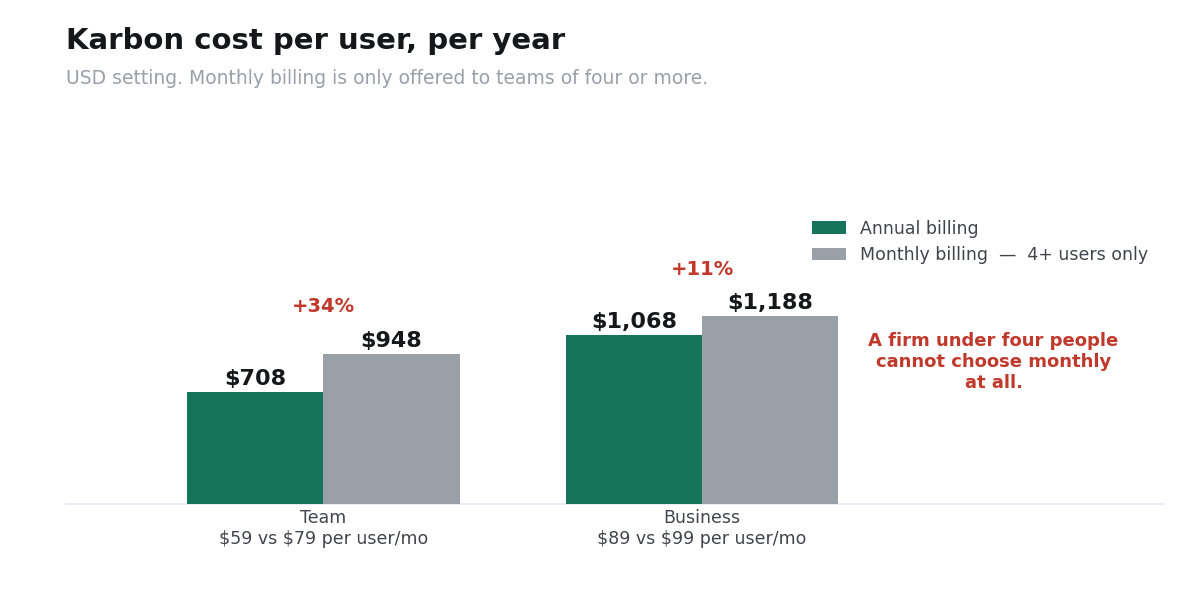
- Annual billing saves 25% at Team level ($59 against $79) and 10% at Business ($89 against $99) — put the other way, monthly costs 34% more on Team. Even where monthly is available it is expensive at the tier a small firm would buy.
The plans
| Plan | Annual billing | Monthly billing | Per user/year | 5 users/year |
|---|---|---|---|---|
| Team | $59/user/mo | $79 (4+ users only) | $708 | $3,540 |
| Business | $89/user/mo | $99 (4+ users only) | $1,068 | $5,340 |
| Enterprise | Custom quote — enterprise platform, dedicated contact, customisation, unlimited usage limits | |||
USD setting, 2026. Karbon’s page offers AUD, BRL, CAD, EUR, GBP, MXN, NZD, USD and ZAR and defaults by location.
What each tier includes
| Capability | Team | Business |
|---|---|---|
| Integrated email and inbox triage | Yes | Yes |
| Workflow, to-do lists, work timelines | Yes | Yes |
| Time tracking and budget reporting | Yes | Yes |
| Billing, payments, engagements | Yes | Yes |
| Client portal and document management | Yes | Yes |
| Automatic client reminders | No | Yes |
| Task automation | No | Yes |
| Industry integrations | No | Yes |
Automatic client reminders is the line to look at. The single largest time cost in an accounting firm is chasing clients for source documents — at forty-five minutes a client across three hundred returns that is 225 hours, or about $33,750 at a $150 billable rate. Automated reminders are the feature that reduces it, and they are on Business, not Team.
So for a firm doing volume tax work, the real entry price is $89 a user, not $59. For a bookkeeping practice with a steady monthly cycle and fewer document chases, Team is genuinely enough.
The small-firm trap
Most software gives small buyers flexibility and large buyers a discount. Karbon does the reverse.
| Firm size | Monthly billing available? | Your only option |
|---|---|---|
| 1 user | No | Annual commitment |
| 2–3 users | No | Annual commitment |
| 4+ users | Yes | Monthly or annual |
A solo practitioner testing the platform cannot pay for a month and stop. The trial is the only low-commitment route, so use it properly — build a real client workflow in it rather than clicking around, because the next step is a year.
The annual premium, where you have the choice, is $20 a user a month on Team and $10 on Business. Across ten people that is $2,400 or $1,200 a year for the flexibility to leave.
Karbon against Canopy and TaxDome
| Five-person firm | Per year | The catch |
|---|---|---|
| Karbon Team | $3,540 | No client reminders or task automation; no monthly billing under 4 users |
| Canopy Standard | $4,440 | Add-ons priced per client — $34 each, which overtakes the subscription at 131 clients |
| TaxDome Pro | $4,500 | Published price carries a three-year commitment, billed upfront |
| Karbon Business | $5,340 | — |
Karbon is the cheapest of the three on subscription and the only one whose published price has no asterisk attached. Canopy’s per-client add-ons and TaxDome’s three-year term both mean the headline figure understates the real bill; Karbon’s $59 is $59.
Its weakness is the feature split: the automation that saves the most time sits on the higher tier. Full comparison in our guide to software for accounting firms.
What is not published
- Enterprise pricing — custom, with unlimited usage limits.
- Payment processing rates. Payments are included on both plans; no rate is stated.
- Whether seats can be removed mid-term on an annual plan. Worth asking if your headcount moves with tax season.
Compared with the rest of this category that is a short list, and it is one reason Karbon is the easiest of the three to budget.
FAQ
How much does Karbon cost?
$59 per user per month for Team and $89 for Business on annual billing, or $79 and $99 monthly. Annually that is $708 and $1,068 per user — $3,540 and $5,340 for a five-person firm.
Why can I not pay monthly?
Karbon states that monthly subscriptions are only available for teams of four or more. Below that, annual billing is the only option.
What is the difference between Team and Business?
Business adds automatic client reminders, task automation and industry integrations. Everything else — integrated email, workflow, time tracking, billing, client portal, document management — is on both.
Which plan do I need?
Business, if you do volume tax work. Automatic client reminders address the document chase, which at forty-five minutes a client across three hundred returns costs about $33,750 a year in billable time. Team is enough for a steady bookkeeping cycle.
Why does Karbon show me Euro prices?
The pricing page has a currency selector that defaults to your location. Set it to USD before comparing, or you will be measuring Karbon in one currency against competitors in another.
Is Karbon cheaper than Canopy?
Yes on subscription — $3,540 against $4,440 for five users — and the gap widens once Canopy’s per-client add-ons are counted, since those overtake its whole subscription at 131 clients.
Does Karbon have a free trial?
Access is arranged through a demo rather than a self-serve trial. Given that a small firm cannot pay monthly, use whatever evaluation period you are given to build a real client workflow.
Are there setup or onboarding fees?
None are stated on the pricing page. Confirm in writing.