 MailerLite
 ActiveCampaign
 Omnisend
 Klaviyo
 SE Ranking
 Mangools
 Semrush
 Ahrefs
 Pipedrive
 Zoho CRM
 Salesforce
 HubSpot
 Systeme.io
 GoHighLevel
 ClickFunnels
 Vendasta
Canopy pricing
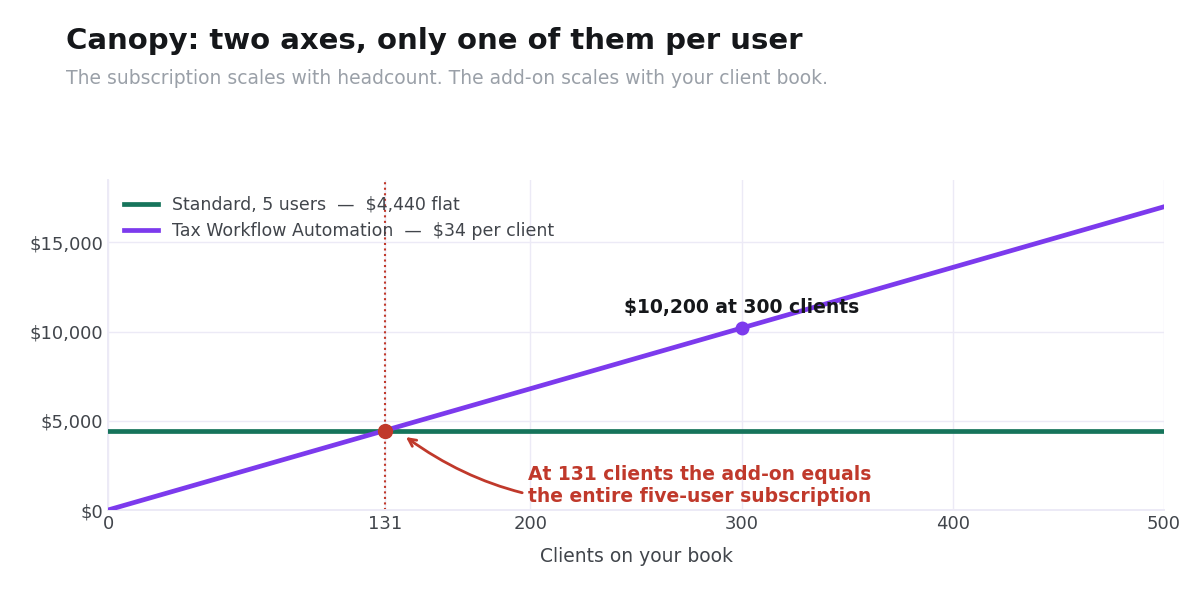
$74, $109 or $149 per user per month — and then the add-ons are priced per client. On a 300-client firm the tax workflow add-on runs to $10,200 a year, more than twice the subscription it sits on top of. Here is the whole structure, and the client count where the model flips.
RealCostLabs is independent and reader-supported. We earn no commission from Canopy, Karbon or TaxDome. Every figure was read from the vendor’s own pricing page in August 2026.
The short answer
A five-person firm pays $4,440 a year on Standard, $6,540 on Plus. Every plan includes the complete practice management suite — CRM, workflow, document management, billing, client portal and payments — so the tiers differ on depth rather than on what you can do at all.
Two things are unusual about the model:
- The add-ons are priced by client, not by user. That is the opposite axis from the subscription, and it is where most of the money is on a busy tax firm.
- Annual billing saves 20%.
The plans
| Plan | Per user/month | Per user/year | 5 users/year | What it adds |
|---|---|---|---|---|
| Standard | $74 | $888 | $4,440 | CRM and client management, document management and eSign, client portal and secure messaging, automated and recurring task workflows, invoicing and payments |
| Plus | $109 | $1,308 | $6,540 | User roles and access controls, more client intake capacity, advanced task views and filters, capacity planning and forecasting, custom reporting |
| Premium (coming soon) | $149 | $1,788 | $8,940 | Advanced workflows and automation, advanced billing scenarios, deep reporting and insights |
| Enterprise | Custom quote. Canopy’s own note: “unless you are a 200 person firm this might not be for you” | |||
Prices are the annual-billed monthly rate; Canopy states annual billing saves 20%, which puts monthly at roughly $93, $136 and $186.
Every tier includes the full suite. Canopy states this explicitly: no plan locks you out of CRM, workflow, documents, billing, the client portal or payments. What the higher tiers buy is depth — permissions, forecasting, custom reporting and more advanced automation.
That is worth knowing because it inverts the usual question. You are not asking “which tier has the feature I need”. You are asking whether you need more of a thing you already have.
The add-ons are priced by client
This is the part that decides your bill, and it does not scale with your headcount.
| Add-on | Price | Priced by | At 300 clients / 5 users |
|---|---|---|---|
| Tax Workflow Automation | From $34 per client | Client | $10,200/yr |
| Tax Resolution | $50/user/month | User | $3,000/yr |
| Close Automation | $10 per connected client/month (first 5 free) | Client | $3,000/yr at 30 monthly clients |
Annual billing. Canopy states volume discounts are available on the per-client add-ons.
Tax Workflow Automation at $34 a client is $10,200 a year on a 300-client book — roughly 2.3 times the $4,440 subscription it sits on.
The precise threshold is worth writing down: at 131 clients the add-on costs the same as the entire five-user Standard subscription. Above that, the per-client line is the larger of the two, and it keeps growing while the subscription does not.
None of this is hidden — it is on the pricing page. But a comparison built on the per-user number describes the smaller half of a Canopy bill.
What to establish before you sign
- The volume-discounted per-client rate at your actual client count. The page says “starting at $34” and that discounts exist. On 300 clients a $5 difference is $1,500 a year.
- Whether you need Tax Workflow Automation at all. The base plans already include automated and recurring task workflows. The add-on is AI-driven intake, document requests, questionnaires and delivery — a different product, sold on the same page.
- The Premium timeline. It is marked coming soon at $149, which matters if you are being sold on features that are not shipped.
- Payment processing rates. Payments are included in every tier but no rate is published.
Canopy against Karbon and TaxDome
| Five-person firm | Per year | Pricing model |
|---|---|---|
| Karbon Team | $3,540 | Per user, annual; monthly only for teams of 4+ |
| Canopy Standard | $4,440 | Per user, plus per-client add-ons |
| TaxDome Pro | $4,500 | Per seat, three-year commitment, billed upfront |
| Karbon Business | $5,340 | Per user |
| Canopy Plus | $6,540 | Per user, plus add-ons |
On subscription the three leaders land within about $1,000 of each other, so the decision is made on the pricing model rather than the price. Canopy is the one where your client count matters more than your headcount; TaxDome is the one where the published figure carries a three-year term; Karbon is the one that will not let a firm under four people pay monthly.
Full comparison in our guide to software for accounting firms.
How to pay less for Canopy
- Pay annually. The 20% saving is $1,110 a year on five Standard seats.
- Price the add-on at your client count before the subscription. Above 131 clients it is the bigger number, and it is the one you can negotiate.
- Ask what the volume discount actually is. “Starting at $34” is an opening position on a 300-client book.
- Check whether Plus earns its $35 a user. It buys permissions, forecasting and custom reporting — $2,100 a year across five people. If nobody will build a custom report, stay on Standard.
- Do not buy Close Automation for clients you do not close monthly. The first five connections are free; beyond that it is $120 a client a year.
FAQ
How much does Canopy cost?
$74 per user per month for Standard on annual billing, $109 for Plus and $149 for Premium, which is marked coming soon. A five-person firm pays $4,440, $6,540 or $8,940 a year before add-ons. Annual billing saves 20% against monthly.
What is included in each Canopy plan?
All of it. Canopy states every plan includes the complete practice management suite — CRM, workflow, document management, billing, client portal, payments and core AI. Higher tiers add depth: user roles and permissions, capacity planning, custom reporting and more advanced automation.
What do Canopy’s add-ons cost?
Tax Workflow Automation starts at $34 per client, Tax Resolution is $50 per user per month, and Close Automation is $10 per connected client per month with the first five free. Volume discounts are available on the per-client items.
Why is the add-on more expensive than the subscription?
Because it is priced by client while the subscription is priced by user. At 131 clients the two are equal for a five-user firm; above that the add-on is larger, and on a 300-client book it is roughly 2.3 times the subscription.
Is Canopy cheaper than Karbon?
Not on subscription — Karbon Team is $3,540 a year for five users against Canopy Standard at $4,440. Canopy’s case is the depth of its tax workflow tooling, which is sold separately and priced per client.
Does Canopy publish payment processing rates?
No. Payments are included in every tier but no card or ACH rate appears on the pricing page. Ask before signing.
What is the Enterprise plan?
Custom pricing, and Canopy is unusually direct about who it is for: its own page says that unless you are a 200-person firm it might not be for you.
Should I pay monthly or annually?
Annually. The 20% saving is $1,110 a year on five Standard seats.