 MailerLite
 ActiveCampaign
 Omnisend
 Klaviyo
 SE Ranking
 Mangools
 Semrush
 Ahrefs
 Pipedrive
 Zoho CRM
 Salesforce
 HubSpot
 Systeme.io
 GoHighLevel
 ClickFunnels
 Vendasta
Salesforce implementation cost
The license is the part you can look up. Implementation is the part that decides the budget, and Salesforce does not publish it. Here is what the license actually costs at the tier teams end up on, what sits on top of it, and how to size the rest before you commit.
RealCostLabs is independent and reader-supported. We may earn a commission on purchases made through our links, at no extra cost to you, and our scores are never for sale.
Start with the license, because it sets everything else
Implementation quotes are usually expressed as a multiple of the first-year license spend. So the license number is not a side issue — it is the input.
| Edition | Per user / month | Billing | Who lands here |
|---|---|---|---|
| Free Suite | $0 | — | Evaluation only |
| Starter Suite | $25 | Monthly available | The advertised entry |
| Professional | $100 | Annual only | Small teams that outgrow Starter |
| Core | $195 | Annual only | The tier with the full toolkit |
| Advanced | $395 | Annual only | Large orgs |
| Max | $550 | Annual only | AI-led deployments |
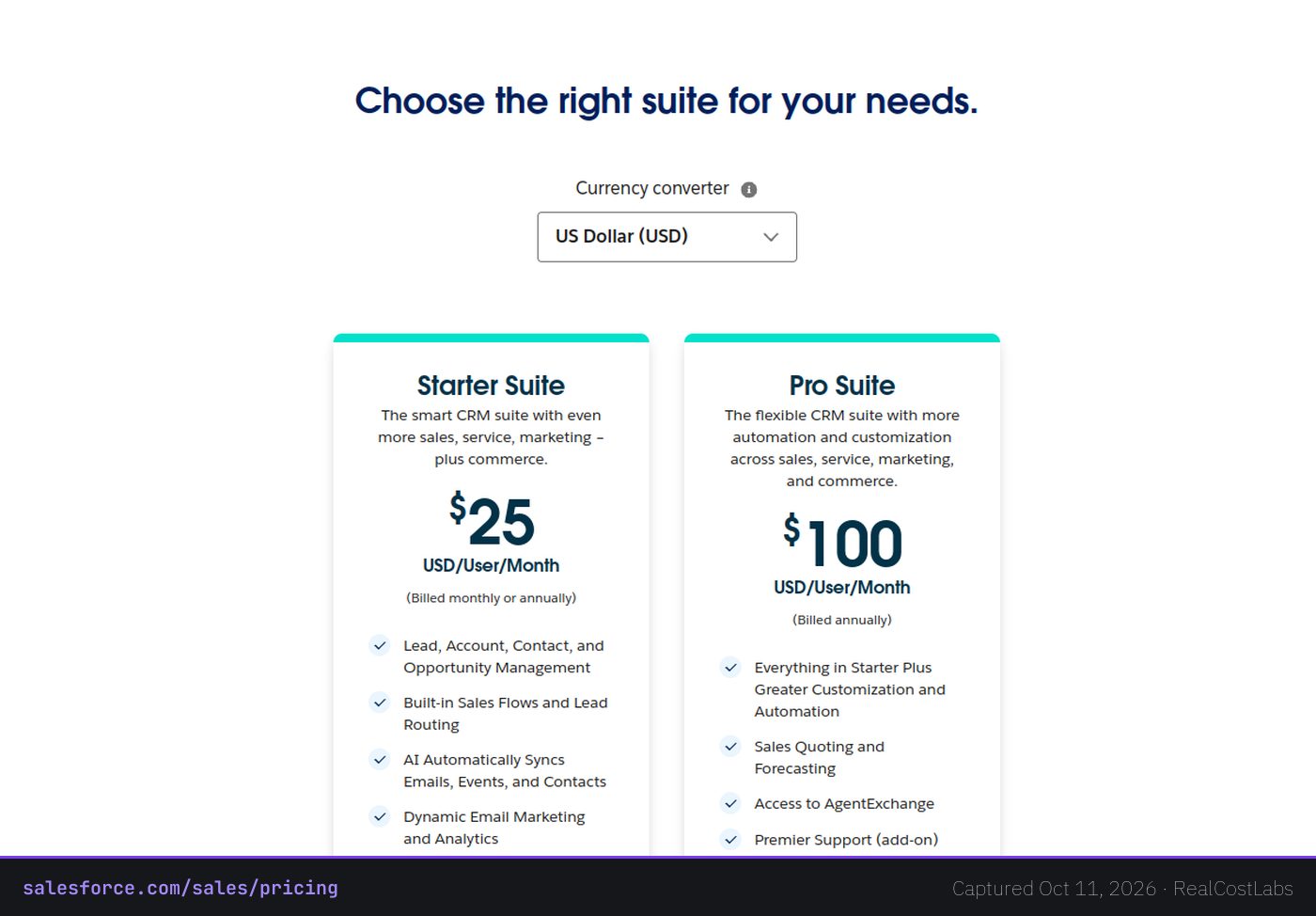
Verified against Salesforce’s published rate card, 2026. Everything above Starter is billed annually with no monthly option.
A ten-seat Core deployment is roughly $45,000 a year once support and AI add-ons are included. That is the figure implementation quotes get anchored to.
What implementation actually covers
Salesforce does not ship configured. Implementation is the work of turning a platform into your CRM, and it breaks into four cost centers.
- Configuration and data migration. Objects, fields, page layouts, permission sets, and moving your existing records in without breaking them. This is the bulk of a first deployment.
- Integration. Connecting Salesforce to email, billing, support and whatever internal systems hold your data. Each connection is scoped separately.
- Training and change management. The cost nobody budgets and everybody pays. A CRM the sales team refuses to update is a total loss regardless of what it cost.
- Ongoing administration. Enterprise Salesforce assumes an administrator. That is either a person, a fraction of a person, or a retainer.
How quotes are usually structured
Partner implementation is priced per project or per day, and the range is genuinely wide — a light Starter rollout and a multi-region Enterprise program are different orders of magnitude. Treat any single published number with suspicion, including ours. The reliable approach is to get two quotes against a written scope, then compare them to the license figures above.
Salesforce’s own Success Plans are the one add-on with a published shape: premium support tiers are charged as a percentage of license spend, which is why the license number compounds.
The question to ask before you scope anything
Not “what does Salesforce cost” but “what is the smallest deployment that solves the actual problem?”
Implementation overspend comes from configuring for a process the company does not yet run. If your sales motion is three stages and two people, you do not need custom objects. The platform will happily let you build them, and the invoice will reflect it.
What the same job costs elsewhere
Salesforce is the right answer for genuinely complex sales organizations. For everyone else, the comparison is stark.
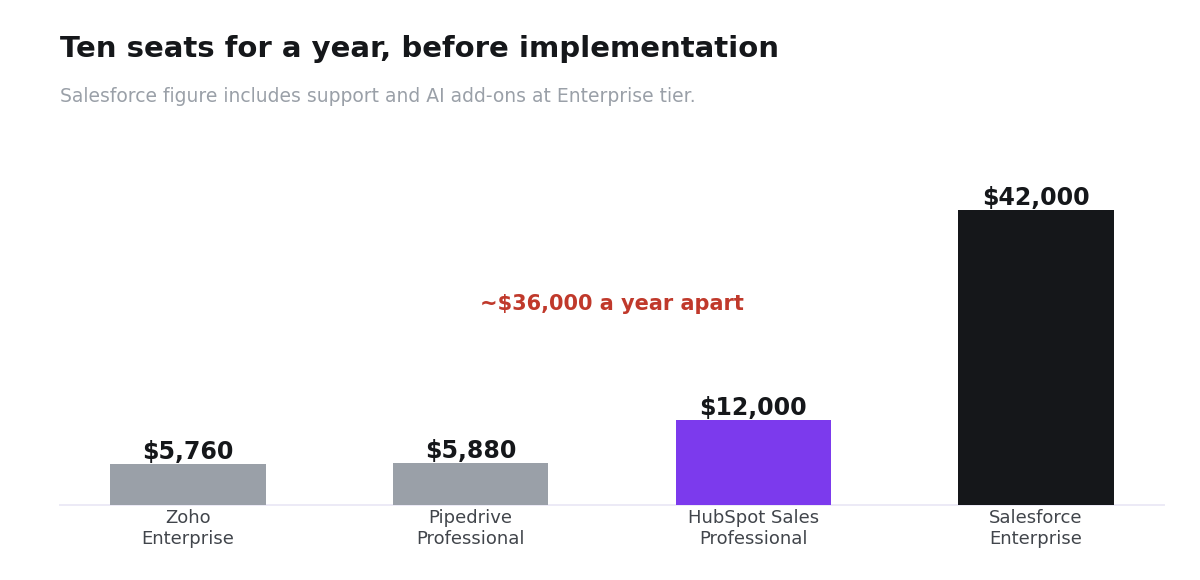
| Tool | Working tier | 10 seats / year | Implementation |
|---|---|---|---|
| Salesforce Core | $195/user/mo | ~$45,000 incl. support and AI | Partner project, quoted separately |
| Zoho CRM Enterprise | $40/user/mo | $4,800 seats, $5,760 with support | Self-serve |
| Pipedrive Premium | $59/seat/mo annual | $7,080 | None — self-serve |
| HubSpot Sales Professional | $100/seat/mo | $12,000 | Mandatory onboarding from $1,500 |
Zoho Enterprise at $5,760 a year against Salesforce Core at roughly $45,000 is a difference of about $39,000 annually for ten people — before implementation enters the comparison at all. That gap has to buy something real.
When Salesforce is genuinely worth it
- Multiple business units with different sales processes in one system.
- Compliance or audit requirements that need granular permissions and field history.
- An ecosystem dependency — the integrations you need exist for Salesforce and nowhere else.
- You already employ an administrator, so the ongoing cost is sunk.
If none of those describe you, the implementation quote is the moment to reconsider the platform rather than the scope.
Common questions
How much does Salesforce cost per user?
$25 on Starter Suite, $100 on Professional, $195 on Core, $395 on Advanced and $550 on Max. Everything above Starter is annual-only billing.
Is implementation included in the license?
No. Configuration, migration, integration and training are separate, and Salesforce does not publish rates for them.
Can I implement Salesforce myself?
Starter Suite, yes. Enterprise, rarely well — the permission model and automation framework reward experience, and a bad first configuration is expensive to unwind.
What is the cheapest way to run Salesforce?
Start on Starter Suite, resist custom objects, and only move to Enterprise when a specific requirement forces it. The edition jump is what drives both license and implementation cost.
What is a realistic all-in first-year budget?
Take the license figure for your seat count from the table above, then get two written partner quotes against a defined scope. Anyone quoting implementation without seeing your process is guessing.